

When to use this
- You want a single UI Kit theme that matches your app branding.
- You need light and dark mode support with consistent colors.
- You want to customize primary, background, or text colors across UI Kit.
- You want a different UI Kit theme for a specific activity.
Prerequisites
- CometChat UI Kit for Android is installed and initialized.
- You can edit
app/src/main/res/values/themes.xml. - You can edit
AndroidManifest.xml. - Optional: You can create
app/src/main/res/values-night/themes.xmlfor dark mode overrides.
Quick start
Create or update your theme
File:
app/src/main/res/values/themes.xml. Extend CometChatTheme.DayNight as the base theme.Apply the theme to the app
File:
AndroidManifest.xml. Set android:theme on the <application> element.Optional: Apply a theme to a specific activity
File:
AndroidManifest.xml. Set android:theme on a specific <activity> if needed.Override key theme attributes
File:
app/src/main/res/values/themes.xml. Update cometchatPrimaryColor and other attributes.Optional: Add dark mode overrides
File:
app/src/main/res/values-night/themes.xml. Override attributes for dark mode.Core concepts
CometChatTheme.DayNight: Base UI Kit theme built onTheme.MaterialComponents.DayNight.NoActionBar.- Theme attributes:
cometchatPrimaryColor,cometchatBackgroundColor,cometchatTextColorPrimary, and others. values-night: Android resource folder for dark mode overrides.
Implementation
Create an app theme that extends CometChatTheme.DayNight
What you’re changing: The base theme used by UI Kit components.
- Where to change it:
app/src/main/res/values/themes.xml. - Applies to: All UI Kit components.
- Default behavior: UI Kit uses
CometChatTheme.DayNight. - Override: Define your app theme and set
parent="CometChatTheme.DayNight". - Code:
themes.xml
- What this does: Creates an app theme that inherits all UI Kit styling.
- Verify: UI Kit screens render correctly after the theme is applied.
Apply the theme to your application
What you’re changing: The theme applied to the entire app.-
Where to change it:
AndroidManifest.xml. - Applies to: All activities unless overridden.
- Default behavior: The application theme is not set to your UI Kit theme.
-
Override: Set
android:themeon the<application>element. - Code:
AndroidManifest.xml
-
What this does: Applies
AppThemeto every activity by default. - Verify: Launch any UI Kit screen and confirm the theme is applied.
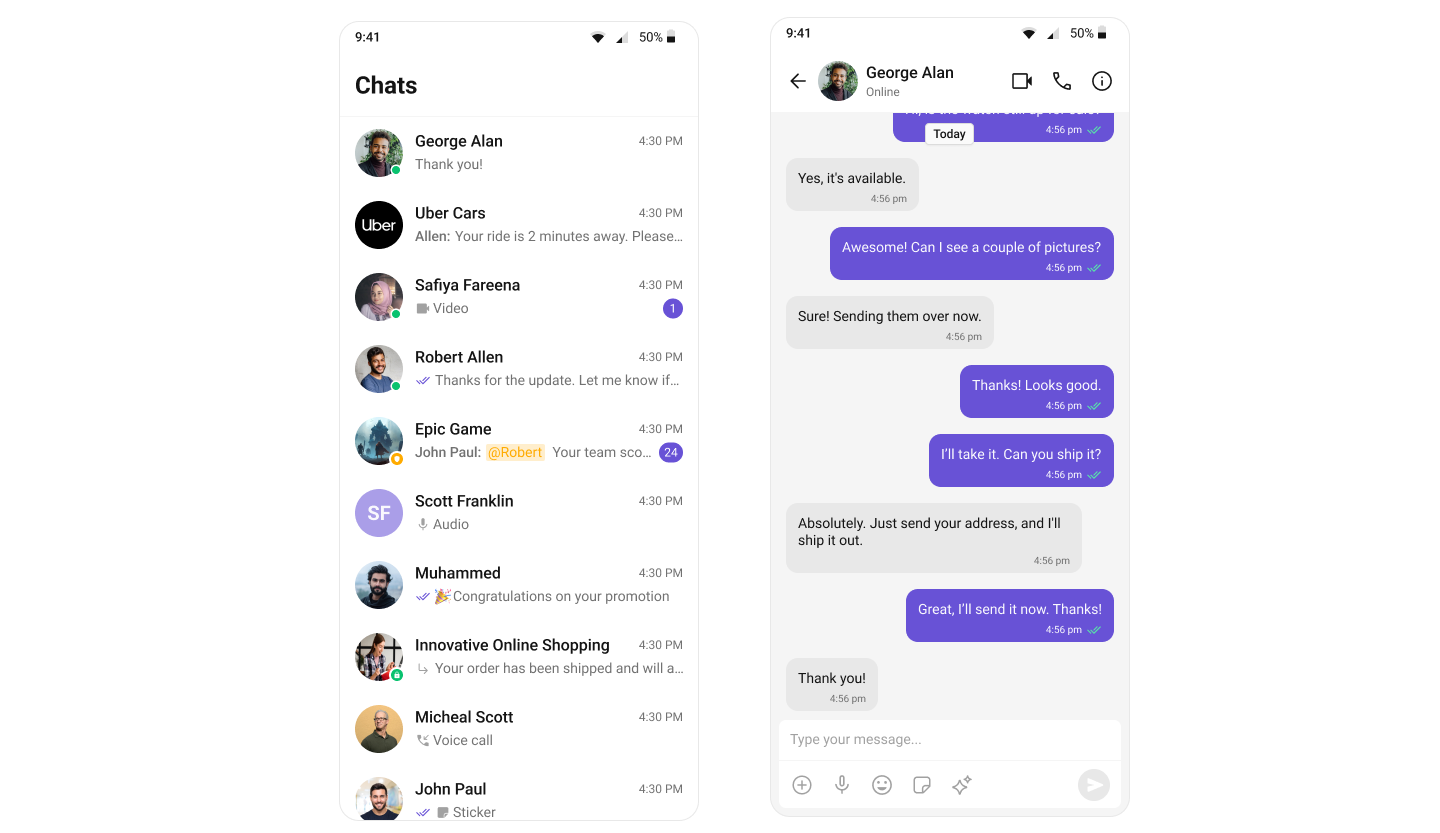
Apply a theme to a specific activity
What you’re changing: The theme for a single activity.-
Where to change it:
AndroidManifest.xml. - Applies to: Only the targeted activity.
- Default behavior: Activities inherit the application theme.
-
Override: Set
android:themeon the<activity>element. - Code:
AndroidManifest.xml
-
What this does: Applies
ChatThemeonly toChatActivity. -
Verify: Open
ChatActivityand confirm the theme differs from the rest of the app.
Change the primary color
What you’re changing: The primary brand color used across UI Kit.-
Where to change it:
app/src/main/res/values/themes.xml. - Applies to: Buttons, highlights, and interactive elements.
- Default behavior: UI Kit uses the default primary color.
-
Override: Set
cometchatPrimaryColorin your theme. - Code:
themes.xml
- What this does: Replaces the UI Kit primary color with your brand color.
- Verify: Buttons and highlights use the new color.
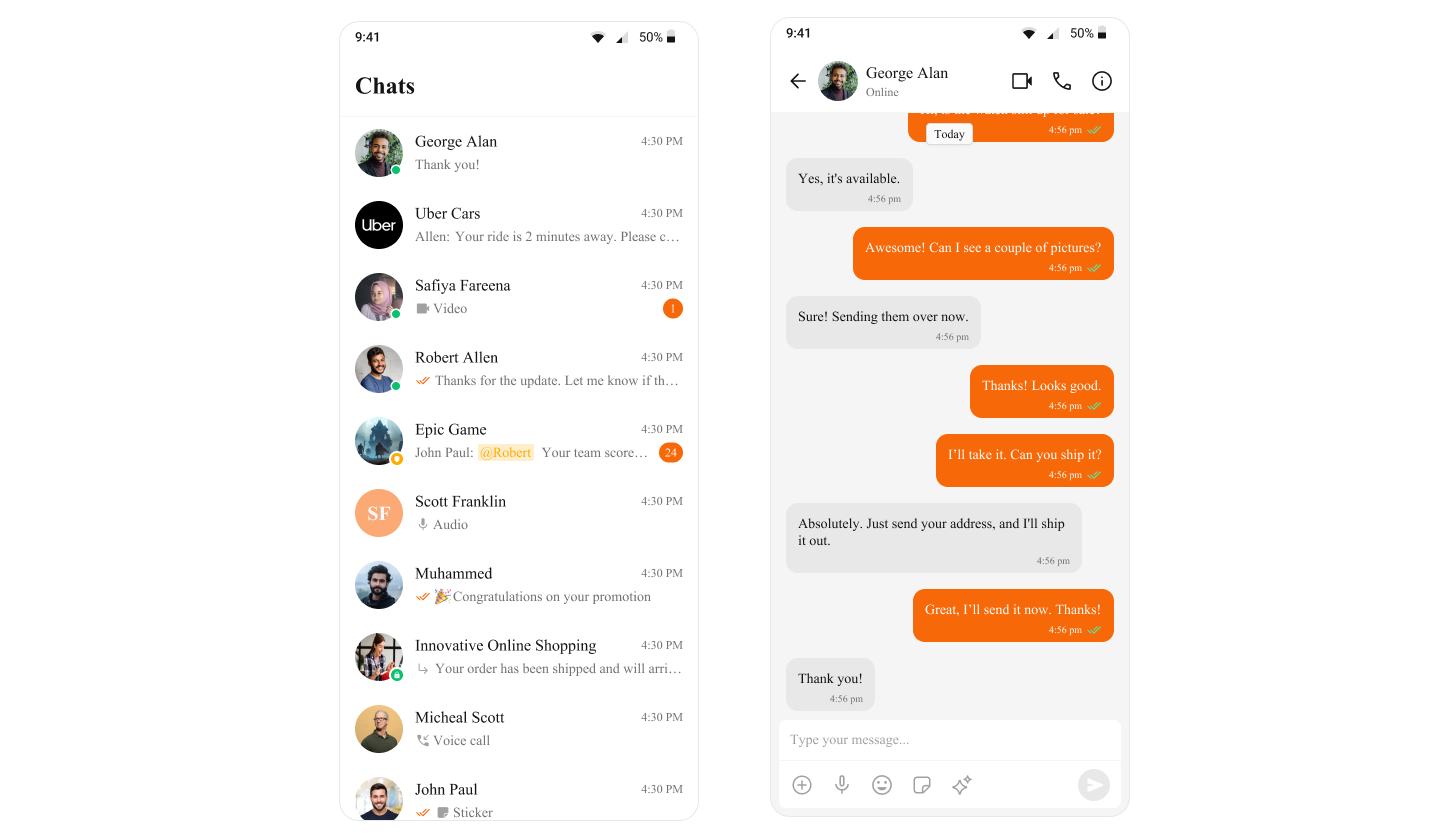
Customize common theme attributes
What you’re changing: Background, text, and stroke colors.-
Where to change it:
app/src/main/res/values/themes.xml. - Applies to: All UI Kit components that use these attributes.
- Default behavior: UI Kit uses its default theme values.
- Override: Define the attributes in your app theme.
- Code:
themes.xml
- What this does: Updates common UI Kit colors in one place.
- Verify: Backgrounds, text, and dividers reflect the new values.
Add dark mode overrides
What you’re changing: Theme values used in dark mode.-
Where to change it:
app/src/main/res/values-night/themes.xml. - Applies to: Dark mode only.
- Default behavior: Dark mode uses the same values as light mode.
-
Override: Create
values-night/themes.xmland override the attributes. - Code:
values-night/themes.xml
- What this does: Applies dark mode colors when the system uses night mode.
- Verify: Toggle dark mode on the device and confirm UI Kit colors update.
For a complete list of theme attributes, visit the theme attributes file on GitHub.
Customization matrix
| What you want to change | Where | Property/API | Example |
|---|---|---|---|
| Base UI Kit theme | app/src/main/res/values/themes.xml | parent="CometChatTheme.DayNight" | <style name="AppTheme" parent="CometChatTheme.DayNight"> |
| App theme in manifest | AndroidManifest.xml | android:theme | android:theme="@style/AppTheme" |
| Activity-specific theme | AndroidManifest.xml | android:theme | android:theme="@style/ChatTheme" |
| Primary color | app/src/main/res/values/themes.xml | cometchatPrimaryColor | <item name="cometchatPrimaryColor">#F76808</item> |
| Background color | app/src/main/res/values/themes.xml | cometchatBackgroundColor | <item name="cometchatBackgroundColor">#FFFFFF</item> |
| Secondary background color | app/src/main/res/values/themes.xml | cometchatBackgroundColorSecondary | <item name="cometchatBackgroundColorSecondary">#F5F5F5</item> |
| Primary text color | app/src/main/res/values/themes.xml | cometchatTextColorPrimary | <item name="cometchatTextColorPrimary">#000000</item> |
| Secondary text color | app/src/main/res/values/themes.xml | cometchatTextColorSecondary | <item name="cometchatTextColorSecondary">#666666</item> |
| Divider/stroke color | app/src/main/res/values/themes.xml | cometchatStrokeColor | <item name="cometchatStrokeColor">#E0E0E0</item> |
| Dark mode primary color | app/src/main/res/values-night/themes.xml | cometchatPrimaryColor | <item name="cometchatPrimaryColor">#8B7FFF</item> |
| Dark mode background color | app/src/main/res/values-night/themes.xml | cometchatBackgroundColor | <item name="cometchatBackgroundColor">#1A1A1A</item> |
| Dark mode primary text color | app/src/main/res/values-night/themes.xml | cometchatTextColorPrimary | <item name="cometchatTextColorPrimary">#FFFFFF</item> |
Common pitfalls and fixes
- Theme not applied: Confirm
android:themeis set on the<application>element. - Activity theme not changing: Ensure the activity has its own
android:themeattribute. - Colors not updating: Make sure the attributes are defined under your theme that extends
CometChatTheme.DayNight. - Dark mode not working: Add
values-night/themes.xmland place overrides there. - Unexpected colors in dark mode: Check for conflicting values in
valuesandvalues-nightresources. - UI Kit still shows defaults: Rebuild and relaunch the app after theme changes.
FAQ
Q: Do I have to useCometChatTheme.DayNight?A: Yes. It is the base UI Kit theme and must be the parent of your app theme. Q: Can I have a different theme for chat screens only?
A: Yes. Set
android:theme on the specific activity in AndroidManifest.xml.
Q: Where can I find all available theme attributes?A: Use the theme attributes file.