

ShortCutFormatter extends CometChatTextFormatter to provide a mechanism for handling message shortcuts within CometChatMessageComposer, enabling users to type a tracking character and receive shortcut suggestions fetched from the CometChat message-shortcuts extension.
When to Use This
- You want to add shortcut text expansion to the message composer (e.g., typing
!hiexpands to a predefined message) - You need to fetch and display message shortcuts from the CometChat
message-shortcutsextension - You want to show suggestion items in the composer when a user types a shortcut trigger character
- You need to create a custom text formatter that extends
CometChatTextFormatter - You want to integrate shortcut functionality alongside other text formatters in
CometChatMessageComposer
Prerequisites
- CometChat Android UI Kit dependency added to your project
CometChatUIKit.init()called and completed- A logged-in CometChat user
- The
message-shortcutsCometChat extension enabled on your app - Familiarity with the CometChatMessageComposer component
Quick Start
- Create a
ShortCutFormatterclass that extendsCometChatTextFormatterwith'!'as the tracking character:
- Kotlin
- Java
What this does: Defines aShortCutFormatterclass that extendsCometChatTextFormatterwith'!'as the tracking character. The class declares aHashMapto store shortcut key-value pairs and a list to holdSuggestionItemobjects for display.
-
Add a constructor that calls
prepareShortCuts()to fetch shortcuts from the server, and override thesearch()andonScrollToBottom()methods (see the Implementation section for full code). -
Initialize an instance of
ShortCutFormatter:
- Kotlin
- Java
What this does: Creates a newShortCutFormatterinstance. The constructor callsprepareShortCuts(), which fetches message shortcuts from the CometChatmessage-shortcutsextension.
- Get the existing text formatters from
CometChatUIKit.getDataSource(), add theShortCutFormatter, and pass the list toCometChatMessageComposerviasetTextFormatters():
- Kotlin
- Java
What this does: Retrieves the default text formatters fromCometChatUIKit.getDataSource(), adds theShortCutFormatterto the list, and passes the combined list toCometChatMessageComposerviasetTextFormatters(). The composer now supports both the default formatters and the shortcut formatter.
Core Concepts
The Text Formatter Extension Pattern
ShortCutFormatter extends CometChatTextFormatter, which is the base class for all text formatters in the CometChat UI Kit. By extending this class, you can create custom formatters that plug into any component accepting text formatters via setTextFormatters().
The key elements of the extension pattern:
- Tracking character: The constructor passes a character (in this case
'!') toCometChatTextFormatter. When the user types this character in the composer, the formatter activates and begins matching input against registered shortcuts. search()method: Override this method to define how the formatter matches user input against available shortcuts. The method receives the current query string and updates the suggestion list.SuggestionItemlist: The formatter populates a list ofSuggestionItemobjects and passes them to the UI viasetSuggestionItemList()(Java) orsuggestionItemList.value(Kotlin). The composer displays these as selectable suggestions.onScrollToBottom()method: Override this method to handle scroll-to-bottom events in the suggestion list. This is required by theCometChatTextFormatterbase class.
How Shortcuts Work
- On initialization,
prepareShortCuts()callsCometChat.callExtension("message-shortcuts", "GET", "/v1/fetch", ...)to fetch shortcut key-value pairs from the server. - The fetched shortcuts are stored in a
HashMap<String, String>where keys are shortcut triggers (e.g.,!hi) and values are the expanded text. - When the user types the tracking character
'!'followed by text, thesearch()method checks if the combined string matches a key in the shortcuts map. - If a match is found, a
SuggestionItemis created showing the shortcut and its expansion (e.g.,!hi => Hello, how are you?), and the suggestion list is updated.
Implementation
Class Creation
What you are changing: Creating theShortCutFormatter class that extends CometChatTextFormatter to handle message shortcuts.
- Where: A new class file in your project (e.g.,
ShortCutFormatter.javaorShortCutFormatterKotlin.kt) - Applies to:
CometChatMessageComposer(viasetTextFormatters()) - Default behavior: Without this class, the message composer has no shortcut expansion functionality
- Override: Create a class extending
CometChatTextFormatterwith'!'as the tracking character, and declare aHashMapfor shortcuts and aListforSuggestionItemobjects
- Kotlin
- Java
What this does: Defines theShortCutFormatterclass extendingCometChatTextFormatterwith'!'as the tracking character. It declares aHashMap<String, String>to store shortcut key-value pairs and aList<SuggestionItem>to hold suggestion items displayed in the composer.
- Verify: The class compiles without errors and extends
CometChatTextFormatterwith the'!'character passed to the superclass constructor.
Constructor
What you are changing: Initializing the shortcuts map and list, and triggering the server fetch for shortcuts.- Where: The constructor of
ShortCutFormatter(Java) or theinitblock ofShortCutFormatterKotlin(Kotlin) - Applies to:
ShortCutFormatter/ShortCutFormatterKotlin - Default behavior: Without the constructor, the
messageShortcutsmap andshortcutslist are not initialized, and shortcuts are not fetched from the server - Override: In Java, initialize
messageShortcutsandshortcutsin the constructor and callprepareShortCuts(). In Kotlin, callprepareShortCuts()in theinitblock (properties are initialized at declaration)
- Kotlin
- Java
What this does: In Kotlin, theinitblock callsprepareShortCuts()to fetch shortcuts from the server on initialization. In Java, the constructor callssuper('!')to set the tracking character, initializes themessageShortcutsHashMap andshortcutsArrayList, and callsprepareShortCuts()to fetch shortcuts.
- Verify: After constructing a
ShortCutFormatterinstance, theprepareShortCuts()method is called, which initiates a network request to fetch message shortcuts from the CometChatmessage-shortcutsextension.
Prepare Shortcuts
What you are changing: Implementing the method that fetches shortcut key-value pairs from the CometChatmessage-shortcuts extension.
- Where: The
prepareShortCuts()method insideShortCutFormatter/ShortCutFormatterKotlin - Applies to:
ShortCutFormatter/ShortCutFormatterKotlin - Default behavior: Without this method, the
messageShortcutsmap remains empty and no shortcuts are available for matching - Override: Implement
prepareShortCuts()to callCometChat.callExtension("message-shortcuts", "GET", "/v1/fetch", ...)and populate themessageShortcutsmap from the JSON response
- Kotlin
- Java
What this does: Calls the CometChatmessage-shortcutsextension viaCometChat.callExtension()with a GET request to/v1/fetch. On success, it parses the JSON response to extract theshortcutsobject fromdata, iterates over its keys, and stores each shortcut key-value pair in themessageShortcutsHashMap.
- Verify: After the extension call completes, the
messageShortcutsHashMap contains the shortcut key-value pairs fetched from the server (e.g.,"!hi"→"Hello, how are you?"). If the extension is not enabled or the request fails, theonErrorcallback is invoked and the map remains empty.
Override Search Method
What you are changing: Implementing the logic that matches user input against stored shortcuts and updates the suggestion list.- Where: The
search()method override insideShortCutFormatter/ShortCutFormatterKotlin - Applies to:
CometChatMessageComposer(the composer callssearch()when the user types after the tracking character) - Default behavior: The base
CometChatTextFormatter.search()does nothing — no suggestions are shown - Override: Override
search()to combine the tracking character with the query string, check if the combined string exists as a key inmessageShortcuts, and if so, create aSuggestionItemand update the suggestion list
- Kotlin
- Java
What this does: Combines the tracking character ('!') with the user’s query string to form the full shortcut key. Clears the current suggestions list, then checks if themessageShortcutsmap contains the key. If a match is found, it creates aSuggestionItemdisplaying the shortcut and its expansion (e.g.,!hi => Hello, how are you?), hides the leading icon, and updates the suggestion list so the composer displays the match.
- Verify: When the user types
!followed by a valid shortcut key (e.g.,!hi) in the message composer, a suggestion item appears showing the shortcut and its expanded text. If the typed text does not match any shortcut key, no suggestions are displayed.
Handle Scroll to Bottom
What you are changing: Providing the requiredonScrollToBottom() override for the CometChatTextFormatter base class.
- Where: The
onScrollToBottom()method override insideShortCutFormatter/ShortCutFormatterKotlin - Applies to:
ShortCutFormatter/ShortCutFormatterKotlin - Default behavior: The base class requires this method to be overridden
- Override: Override
onScrollToBottom()with an empty implementation or a placeholder, since shortcut suggestions do not require scroll-to-bottom handling
- Kotlin
- Java
What this does: Provides the required override ofonScrollToBottom()from theCometChatTextFormatterbase class. In this implementation, the method body is left as a placeholder because shortcut suggestions do not require scroll-to-bottom handling.
- Verify: The class compiles without errors with the
onScrollToBottom()override in place.
Integration with MessageComposer
What you are changing: Adding theShortCutFormatter to CometChatMessageComposer so that shortcut suggestions appear when the user types the tracking character.
- Where: Your Activity or Fragment where you configure
CometChatMessageComposer - Applies to:
CometChatMessageComposer - Default behavior: Without adding the
ShortCutFormatter, the message composer does not display shortcut suggestions when the user types'!' - Override: Add a
CometChatMessageComposerto your XML layout, then in your Activity or Fragment, get the existing text formatters fromCometChatUIKit.getDataSource().getTextFormatters(), add aShortCutFormatterinstance, and callsetTextFormatters()on the composer
What this does: Adds aCometChatMessageComposerwidget to your XML layout with the idcomposer, set to fill the parent width and height.
- Kotlin
- Java
What this does: Finds theCometChatMessageComposerview by its id, retrieves the default text formatters list fromCometChatUIKit.getDataSource().getTextFormatters(), adds a newShortCutFormatterinstance to the list, and passes the combined list to the composer viasetTextFormatters(). The composer now supports shortcut suggestions alongside any default formatters.
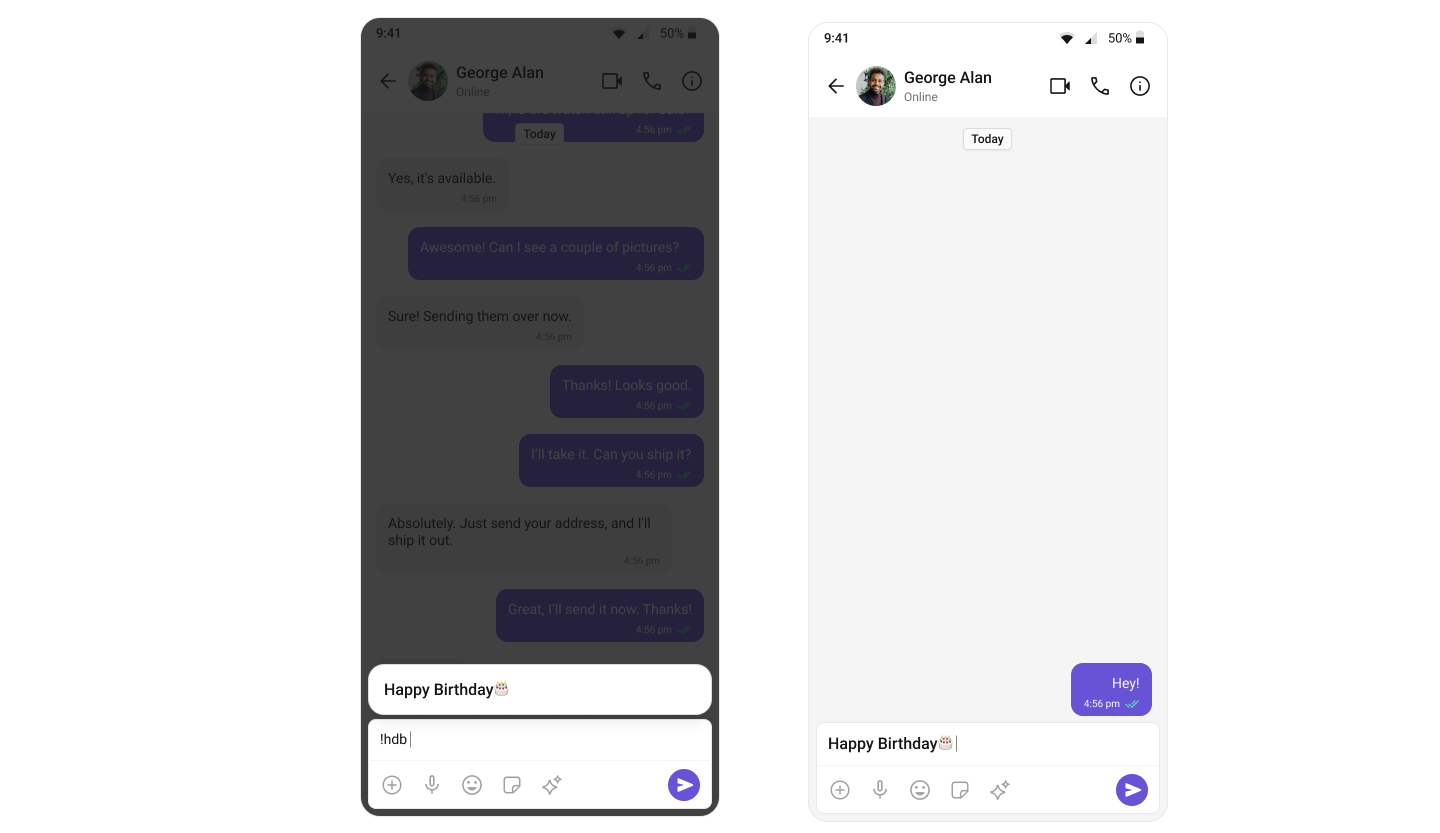
- Verify: After running the app, typing
!followed by a valid shortcut key in the message composer displays a suggestion item showing the shortcut and its expanded text. Selecting the suggestion inserts the expanded text into the composer.
Common Pitfalls and Fixes
| Pitfall | Fix |
|---|---|
Shortcut suggestions do not appear when typing ! | Confirm that the ShortCutFormatter instance is added to the formatters list and that setTextFormatters() is called on the CometChatMessageComposer instance. |
| Formatter created but not added to the formatters list | Call cometChatTextFormatters.add(new ShortCutFormatter()) (Java) or cometChatTextFormatters.add(ShortCutFormatter()) (Kotlin) before calling setTextFormatters(). If the formatter is not in the list, setTextFormatters() has no effect on shortcut handling. |
Called setTextFormatters() with an empty list | Add at least one formatter to the list before calling setTextFormatters(). Retrieve the default formatters via CometChatUIKit.getDataSource().getTextFormatters(this) and add the ShortCutFormatter to that list. |
prepareShortCuts() does not populate the shortcuts map | Confirm that the message-shortcuts CometChat extension is enabled on your CometChat dashboard. The CometChat.callExtension("message-shortcuts", "GET", "/v1/fetch", ...) call returns an empty or error response if the extension is not enabled. |
Shortcuts fetched but search() does not find matches | The search() method combines the tracking character '!' with the query string to form the lookup key. Confirm that the keys stored in messageShortcuts include the '!' prefix (e.g., "!hi", not "hi"). |
CometChatMessageComposer not found in layout | Confirm that your XML layout includes <com.cometchat.chatuikit.messagecomposer.CometChatMessageComposer> with the correct android:id matching the findViewById() call. |
FAQ
Q: What tracking character doesShortCutFormatter use?
A: ShortCutFormatter uses '!' as the tracking character, passed to the CometChatTextFormatter superclass constructor. When the user types ! in the message composer, the formatter activates and begins matching input against stored shortcuts.
Q: Where does ShortCutFormatter fetch shortcuts from?
A: Shortcuts are fetched from the CometChat message-shortcuts extension via CometChat.callExtension("message-shortcuts", "GET", "/v1/fetch", null, ...). The response JSON contains a data.shortcuts object with key-value pairs.
Q: Can I use ShortCutFormatter alongside other text formatters like CometChatMentionsFormatter?
A: Yes. Retrieve the default formatters list via CometChatUIKit.getDataSource().getTextFormatters(this), add the ShortCutFormatter to the list, and pass the combined list to CometChatMessageComposer via setTextFormatters(). All formatters in the list are active simultaneously.
Q: Do I need to implement onScrollToBottom() with actual logic?
A: The CometChatTextFormatter base class requires the onScrollToBottom() override. For ShortCutFormatter, the method body can be left as a placeholder because shortcut suggestions do not require scroll-to-bottom handling.
Q: What happens if the message-shortcuts extension is not enabled?
A: If the extension is not enabled, the CometChat.callExtension() call triggers the onError callback, and the messageShortcuts map remains empty. The search() method finds no matches, so no suggestions are displayed.
Next steps
- Message Composer component — configure the composer where
ShortCutFormatteris integrated viasetTextFormatters() - Mentions Formatter guide — another text formatter implementation using
CometChatMentionsFormatterfor @mention handling