

CometChatMentionsFormatter formats and styles @mentions within text messages, enabling users to reference other participants in a conversation with customizable appearance and click handling across the message composer, message bubbles, and conversations list.
When to Use This
- You need to format @mentions in text messages displayed in the chat interface
- You want to customize the text style, color, or background of mentions in the message composer
- You want to style mentions differently in outgoing vs. incoming message bubbles
- You need to handle click events on mentions in message bubbles (e.g., navigate to a user profile)
- You want to control which users or group members appear in the mention suggestions list
- You need to customize how mentions appear in the CometChatConversations last-message preview
Prerequisites
- CometChat Android UI Kit dependency added to your project
CometChatUIKit.init()called and completed- A logged-in CometChat user
- Familiarity with the CometChatMessageComposer component
- Familiarity with the CometChatMessageList component
- Familiarity with the CometChatConversations component
Quick Start
- Create an instance of
CometChatMentionsFormatter:
- Kotlin
- Java
What this does: Creates a newCometChatMentionsFormatterinstance initialized with the given AndroidContext.
- Add the formatter to a text formatters list:
- Kotlin
- Java
What this does: Creates a mutable list of CometChatTextFormatter and adds the mentions formatter to it. This list is passed to a component in the next step.
- Pass the formatters list to a component using
setTextFormatters():
- Kotlin
- Java
What this does: Passes the text formatters list (containing the mentions formatter) to theCometChatMessageComposercomponent, enabling mention formatting in the composer. You can also pass this list toCometChatMessageListorCometChatConversationsusing their respectivesetTextFormatters()methods.
Core Concepts
The Formatter Pattern
CometChatMentionsFormatter extends CometChatTextFormatter and plugs into any component that accepts text formatters via setTextFormatters(). The formatter intercepts text rendering and applies mention-specific styling and behavior.
How Mentions Work
- Mention Formatting: The formatter automatically formats mentions within text messages based on provided styles and settings.
- Customizable Styles: You can customize text styles for mentions, including colors, fonts, and background colors.
- User and Group Member Mentions: The formatter supports mentions for both individual users and group members.
- Mention List Generation: The formatter generates a list of suggested mentions based on user input during message composition.
- Mention Click Handling: The formatter provides a listener interface for handling click events on mentions, enabling custom actions when a mention is tapped.
Formatting Methods
The formatter uses these internal methods to apply mention spans in different contexts:prepareLeftMessageBubbleSpan— formats mentions in incoming message bubblesprepareRightMessageBubbleSpan— formats mentions in outgoing message bubblesprepareComposerSpan— formats mentions in the message composerprepareConversationSpan— formats mentions in the conversations list
Implementation
Initialization and Basic Usage
What you are changing: AddingCometChatMentionsFormatter to a component so that mentions are formatted in the chat interface.
- Where: Your Activity or Fragment where you configure
CometChatConversations,CometChatMessageList, orCometChatMessageComposer - Applies to:
CometChatConversations,CometChatMessageList,CometChatMessageComposer - Default behavior: Without a mentions formatter, @mention text renders as plain text with no special styling or click handling
- Override: Create a
CometChatMentionsFormatterinstance, add it to aList<CometChatTextFormatter>, and pass the list to the target component viasetTextFormatters()
- Kotlin
- Java
What this does: Creates aCometChatMentionsFormatterinstance, adds it to a list of text formatters, and prepares the list to be passed toCometChatConversations,CometChatMessageList, orCometChatMessageComposerviasetTextFormatters().
- Verify: After passing the formatters list to a component via
setTextFormatters(), @mentions in messages render with styled text (colored and formatted) instead of plain text.
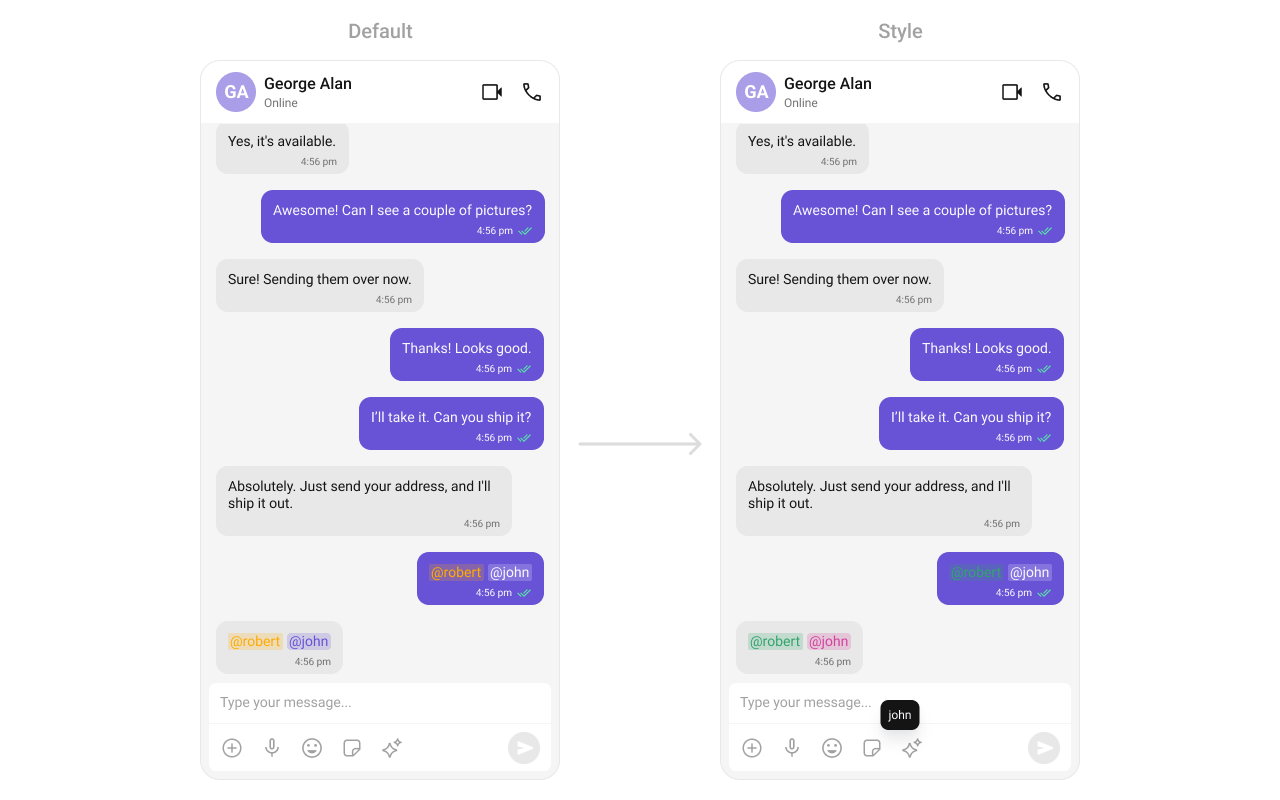
setOnMentionClick Action
What you are changing: Adding a click listener for mentions in message bubbles so that tapping a mention triggers a custom action.
- Where:
CometChatMentionsFormatterinstance, passed toCometChatMessageComposerviasetTextFormatters() - Applies to: Mention text in message bubbles rendered by
CometChatMessageList - Default behavior: Tapping a mention in a message bubble does nothing
- Override: Call
setOnMentionClick()on theCometChatMentionsFormatterinstance with a callback that receives thecontextand the mentioneduserobject
- Kotlin
- Java
What this does: Sets a click listener on the mentions formatter that displays aToastwith the mentioned user’s name when a mention is tapped in a message bubble. The formatter is then added to a list and passed toCometChatMessageComposerviasetTextFormatters().
- Verify: Tapping a mention in a message bubble displays a Toast showing the mentioned user’s name.
Composer Mention Text Style
What you are changing: The visual appearance of mention text inside theCometChatMessageComposer input field.
- Where: XML theme style applied via
mentionFormatter.setMessageComposerMentionTextStyle() - Applies to:
CometChatMessageComposer - Default behavior: Mentions in the composer use the default
CometChatMessageComposerMentionsStyle - Override: Define a custom style extending
CometChatMessageComposerMentionsStylein yourthemes.xml, then callsetMessageComposerMentionTextStyle()on the formatter instance

themes.xml
What this does: Defines a custom XML style for mentions in the message composer. It sets the mention text color toCode:#000000, the self-mention text color to#30A46C, and appliescometchatTextAppearanceBodyRegularfor both mention and self-mention text appearance.
- Kotlin
- Java
What this does: Creates aCometChatMentionsFormatter, applies the customCustomMessageComposerMentionsStyleto it, and passes it toCometChatMessageComposerviasetTextFormatters(). Mentions typed in the composer input field render with the custom style.
- Verify: Mentions typed in the message composer input field display with the custom text color (
#000000), self-mention color (#30A46C), and the specified text appearance, matching theCustomMessageComposerMentionsStyledefinition.
Message Bubble Mention Text Style
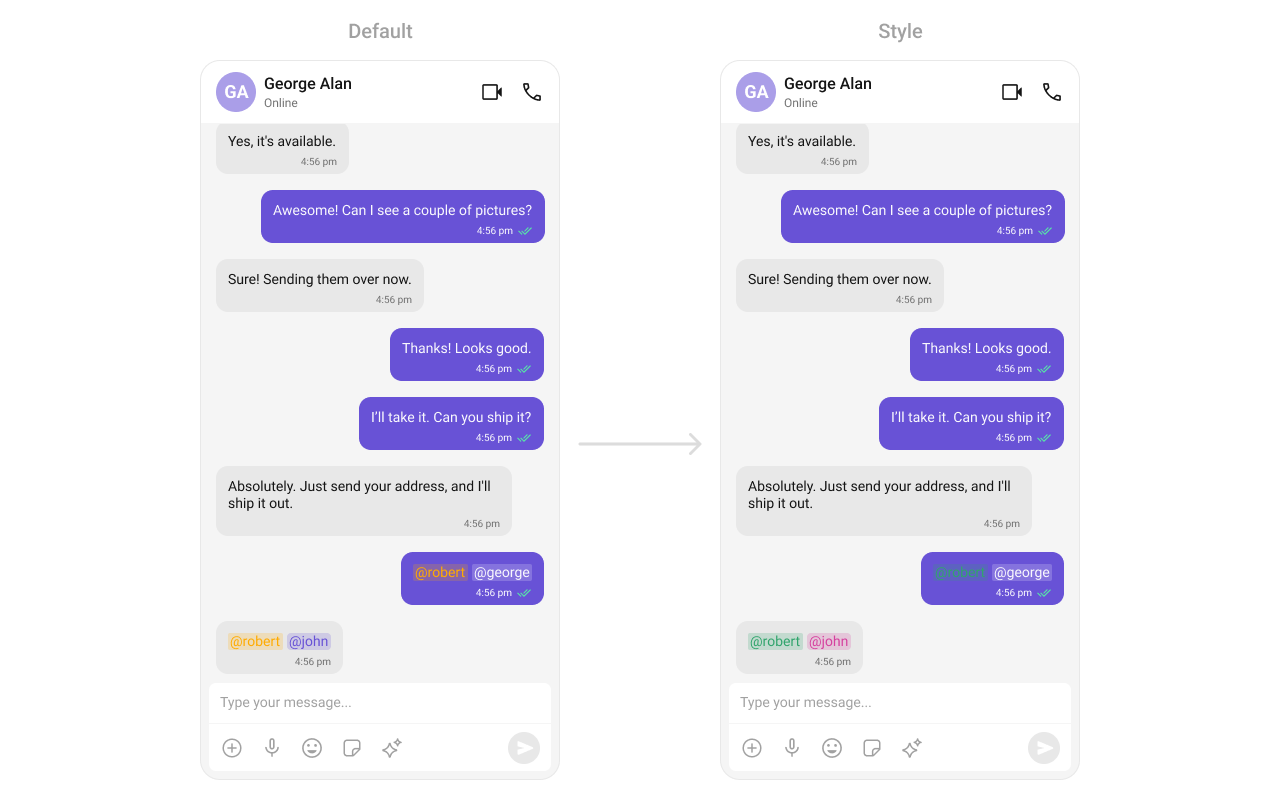
What you are changing: The visual appearance of mention text inside incoming and outgoing message bubbles in theCometChatMessageList.
- Where: XML theme styles applied via
mentionFormatter.setOutgoingBubbleMentionTextStyle()andmentionFormatter.setIncomingBubbleMentionTextStyle() - Applies to:
CometChatMessageList - Default behavior: Incoming mentions use
CometChatIncomingBubbleMentionsStyleand outgoing mentions useCometChatOutgoingBubbleMentionsStyle - Override: Define custom styles extending
CometChatIncomingBubbleMentionsStyleandCometChatOutgoingBubbleMentionsStylein yourthemes.xml, then callsetIncomingBubbleMentionTextStyle()andsetOutgoingBubbleMentionTextStyle()on the formatter instance
themes.xml
What this does: Defines two custom XML styles for mentions in message bubbles. The incoming style sets mention text color toCode:#D6409F(pink). The outgoing style sets mention text color to#FFFFFF(white) with a background color of#F9F8FD. Both styles set self-mention text color to#30A46C(green).
- Kotlin
- Java
What this does: Creates aCometChatMentionsFormatter, applies custom outgoing and incoming bubble mention styles, and passes the formatter toCometChatMessageListviasetTextFormatters(). Mentions in message bubbles render with the custom colors and text appearance.
- Verify: Mentions in outgoing message bubbles display with white text (
#FFFFFF) and a#F9F8FDbackground. Mentions in incoming message bubbles display with pink text (#D6409F). Self-mentions in both bubble types display with green text (#30A46C).
Conversations Mention Text Style
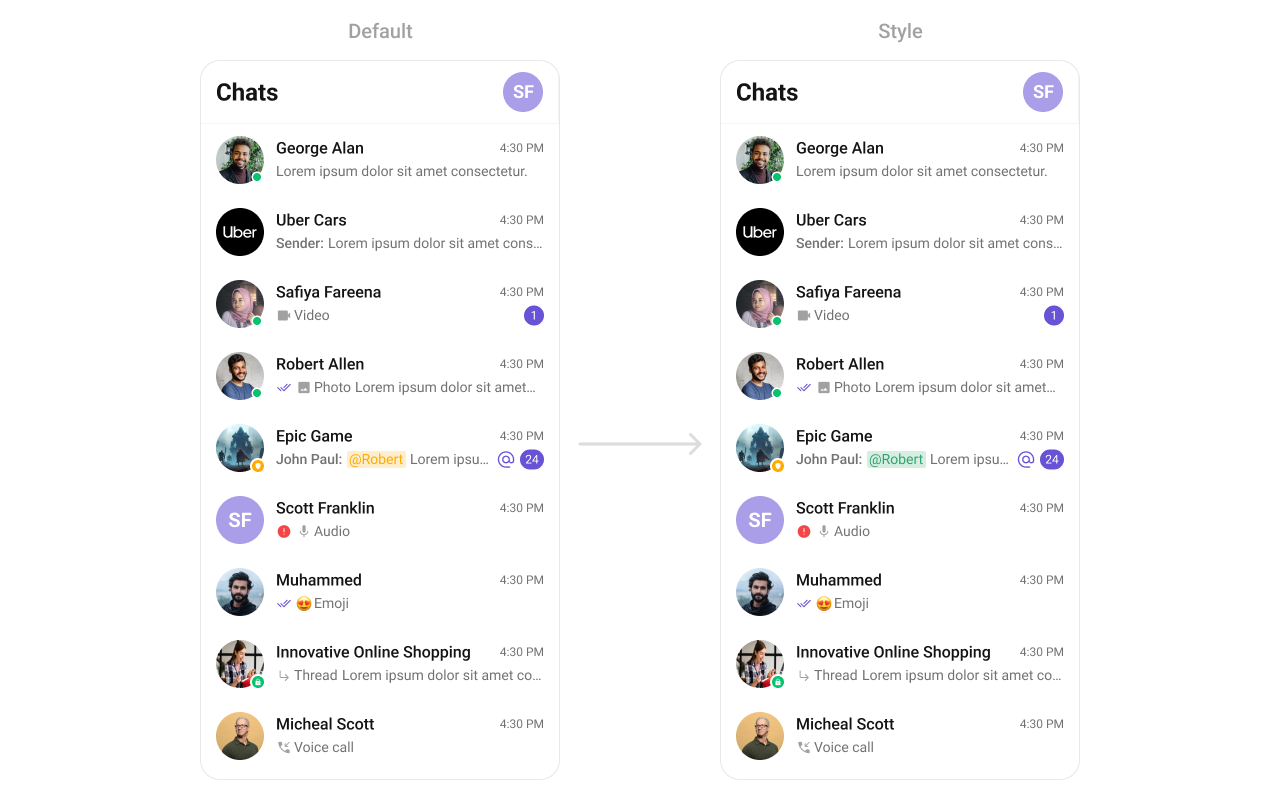
What you are changing: The visual appearance of mention text in the last-message preview of theCometChatConversations list.
- Where: XML theme style applied via
mentionFormatter.setConversationsMentionTextStyle() - Applies to:
CometChatConversations - Default behavior: Mentions in the conversations list use the default
CometChatConversationsMentionsStyle - Override: Define a custom style extending
CometChatConversationsMentionsStylein yourthemes.xml, then callsetConversationsMentionTextStyle()on the formatter instance
themes.xml
What this does: Defines a custom XML style for mentions in the conversations list. It sets the mention text color toCode:#D6409F(pink) and the self-mention text color to#30A46C(green), withcometchatTextAppearanceBodyRegularfor text appearance.
- Kotlin
- Java
What this does: Creates aCometChatMentionsFormatter, applies the customCustomConversationsMentionsStyle, and passes the formatter toCometChatConversationsviasetTextFormatters(). Mentions in the conversations list last-message preview render with the custom style.
- Verify: Mentions in the conversations list last-message preview display with pink text (
#D6409F) for other-user mentions and green text (#30A46C) for self-mentions, matching theCustomConversationsMentionsStyledefinition.
Customization Matrix
| What you want to change | Where | Property/API | Example |
|---|---|---|---|
| Maximum number of mentions allowed | CometChatMentionsFormatter | setMentionLimit(int limit) | mentionFormatter.setMentionLimit(5) |
| Group members fetched for mention suggestions | CometChatMentionsFormatter | .setGroupMembersRequestBuilder(group -> new GroupMembersRequest.GroupMembersRequestBuilder(group.getGuid())); | .setGroupMembersRequestBuilder(group -> new GroupMembersRequest.GroupMembersRequestBuilder(group.getGuid())); |
| Users fetched for mention suggestions | CometChatMentionsFormatter | .setUsersRequestBuilder(new UsersRequest.UsersRequestBuilder().friendsOnly(true)); | .setUsersRequestBuilder(new UsersRequest.UsersRequestBuilder().friendsOnly(true)); |
| Who can be mentioned (users only or users and group members) | CometChatMentionsFormatter | .setMentionsType(UIKitConstants.MentionsType.USERS_AND_GROUP_MEMBERS) | .setMentionsType(UIKitConstants.MentionsType.USERS_AND_GROUP_MEMBERS) |
| Where mentions are visible (one-on-one, group, or both) | CometChatMentionsFormatter | .setMentionsVisibility(UIKitConstants.MentionsVisibility.BOTH); | .setMentionsVisibility(UIKitConstants.MentionsVisibility.BOTH); |
| Click action on a mention in message bubbles | CometChatMentionsFormatter | setOnMentionClick | mentionFormatter.setOnMentionClick((context, user) -> { }); |
| Mention text style in the message composer | CometChatMentionsFormatter | setMessageComposerMentionTextStyle(context, styleRes) | mentionFormatter.setMessageComposerMentionTextStyle(context, R.style.CustomMessageComposerMentionsStyle) |
| Mention text style in outgoing message bubbles | CometChatMentionsFormatter | setOutgoingBubbleMentionTextStyle(context, styleRes) | mentionFormatter.setOutgoingBubbleMentionTextStyle(context, R.style.CustomOutgoingMessageBubbleMentionStyle) |
| Mention text style in incoming message bubbles | CometChatMentionsFormatter | setIncomingBubbleMentionTextStyle(context, styleRes) | mentionFormatter.setIncomingBubbleMentionTextStyle(context, R.style.CustomIncomingMessageBubbleMentionStyle) |
| Mention text style in conversations list | CometChatMentionsFormatter | setConversationsMentionTextStyle(context, styleRes) | mentionFormatter.setConversationsMentionTextStyle(context, R.style.CustomConversationsMentionsStyle) |
Common Pitfalls and Fixes
| Pitfall | Fix |
|---|---|
| Mentions render as plain text with no styling | Create a CometChatMentionsFormatter instance, add it to a List<CometChatTextFormatter>, and pass the list to the component via setTextFormatters(). |
| Formatter created but not added to the formatters list | Call textFormatters.add(mentionFormatter) before passing the list to the component. If the formatter is not in the list, setTextFormatters() has no effect on mention rendering. |
Called setTextFormatters() with an empty list | Add at least one CometChatMentionsFormatter to the list before calling setTextFormatters(). |
| Custom mention style not applied in the composer | Call mentionFormatter.setMessageComposerMentionTextStyle(context, R.style.YourStyle) before passing the formatter to CometChatMessageComposer via setTextFormatters(). |
| Custom mention style not applied in message bubbles | Call both mentionFormatter.setOutgoingBubbleMentionTextStyle() and mentionFormatter.setIncomingBubbleMentionTextStyle() before passing the formatter to CometChatMessageList via setTextFormatters(). If you set only one, the other bubble type uses the default style. |
setOnMentionClick callback not firing | Ensure the formatter is passed to the component via setTextFormatters() after calling setOnMentionClick(). The callback fires only for mentions in message bubbles. |
| Mention suggestions not showing group members | If setMentionsType is set to UIKitConstants.MentionsType.USERS, only users appear in suggestions. Set it to UIKitConstants.MentionsType.USERS_AND_GROUP_MEMBERS to include group members in group chats. |
FAQ
Q: Can I useCometChatMentionsFormatter with CometChatConversations, CometChatMessageList, and CometChatMessageComposer at the same time?
A: Yes. Create a CometChatMentionsFormatter instance, add it to a List<CometChatTextFormatter>, and pass the list to each component separately via their setTextFormatters() method. You can configure different styles for each component on the same formatter instance.
Q: What is the difference between setMentionsType with USERS vs. USERS_AND_GROUP_MEMBERS?
A: If set to USERS, only users can be mentioned in both one-on-one and group conversations. If set to USERS_AND_GROUP_MEMBERS, members of a specific group can be mentioned in group chats, while all users can be mentioned in one-on-one chats.
Q: What does setMentionsVisibility control?
A: setMentionsVisibility controls the scope of where mentions are visible. Set it to UIKitConstants.MentionsVisibility.USERS_CONVERSATION_ONLY for one-on-one conversations only, UIKitConstants.MentionsVisibility.GROUP_CONVERSATION_ONLY for group conversations only, or UIKitConstants.MentionsVisibility.BOTH for both.
Q: How do I customize which users appear in the mention suggestions list?
A: Use setUsersRequestBuilder() to provide a custom UsersRequest.UsersRequestBuilder. For example, .setUsersRequestBuilder(new UsersRequest.UsersRequestBuilder().friendsOnly(true)) limits suggestions to friends only. Use setGroupMembersRequestBuilder() to customize group member suggestions.
Q: Do I need to define separate XML styles for incoming and outgoing bubble mentions?
A: Yes. Incoming and outgoing bubbles use separate style parents (CometChatIncomingBubbleMentionsStyle and CometChatOutgoingBubbleMentionsStyle). Define a custom style for each and apply them with setIncomingBubbleMentionTextStyle() and setOutgoingBubbleMentionTextStyle().
Next steps
- Message Composer component — configure the composer where users type and send messages with mentions
- Message List component — configure the message list where mention-styled bubbles are displayed
- Conversations component — configure the conversations list where mention-styled last-message previews appear