

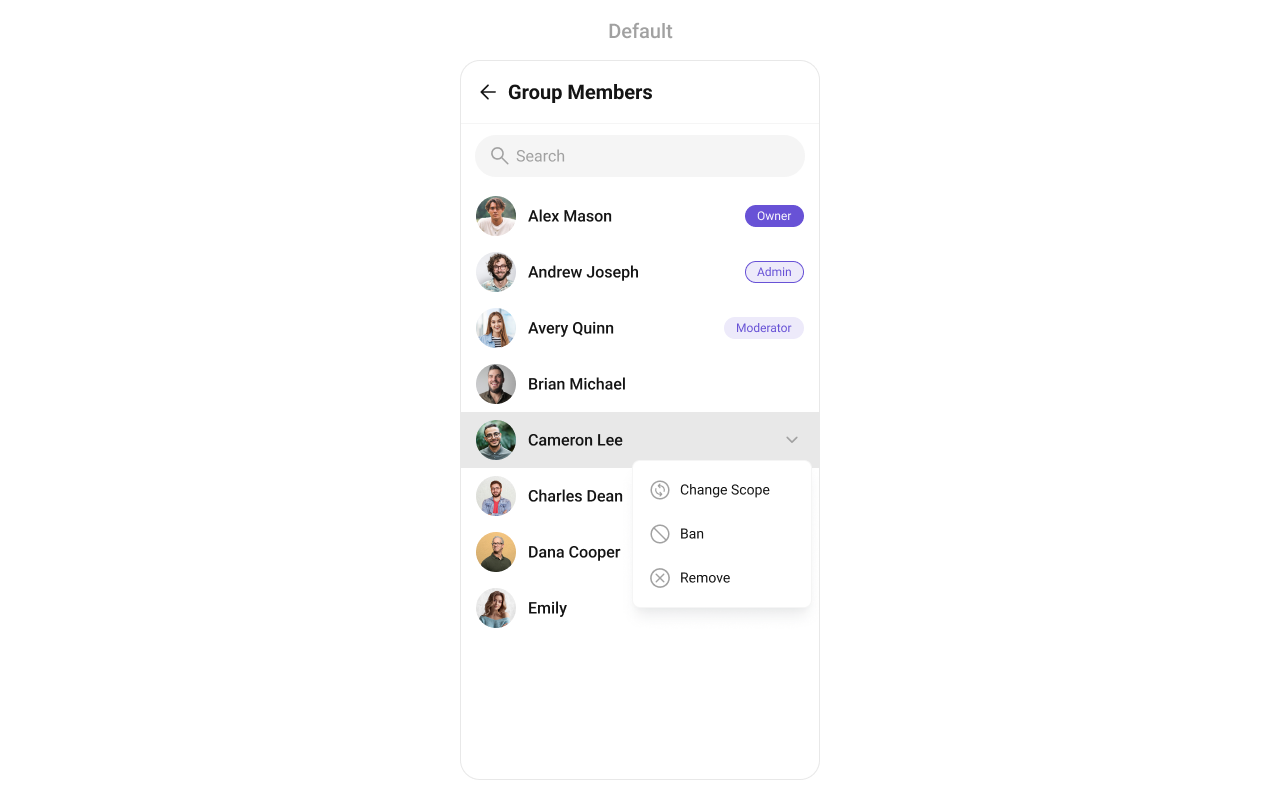
CometChatGroupMembers displays all users who are either added to or invited to a group, enabling them to participate in group discussions, access shared content, and engage in collaborative activities.
When to use this
- You need a screen that lists all members of a specific group.
- You want to show member avatars, names, and scope (admin, moderator, participant).
- You need tap and long-press actions on group member items (view profile, kick, ban, change scope).
- You want to filter group members by scope, search keyword, or custom request builders.
- You need real-time updates when members are banned, kicked, or have their scope changed.
- You want to customize the member list appearance with styles, custom views, or advanced layouts.
Prerequisites
- CometChat SDK initialized with
CometChatUIKit.init()and a user logged in. - The
cometchat-chat-uikit-androiddependency added to your project. - A valid
Groupobject with a group ID (GUID) to pass to the component. - A valid
layout_activity.xmlor Activity/Fragment where you will place the component.
Quick start
- Open your
layout_activity.xmlfile. - Add the
CometChatGroupMembersXML element:
layout_activity.xml
What this does: Adds theCometChatGroupMemberscomponent to your layout. It fills the available width and height and renders the group member list once aGroupobject is set.
- In your Activity or Fragment, get a reference to the component and set the
Groupobject:
- Java
- Kotlin
What this does: Creates aGroupobject with a group ID and name, then passes it to theCometChatGroupMemberscomponent. The component fetches and displays all members of that group.
- Build and run your app.
- Verify that the group member list appears with avatars, names, and member scopes.
Core concepts
CometChatGroupMembers: The main component class that renders the group member list. It requires aGroupobject set viasetGroup().- Actions: Callbacks such as
setOnItemClick,setOnItemLongClick,setOnBackPressListener,setOnSelect,setOnError,setOnLoad, andsetOnEmptythat let you respond to user interactions. - Filters: Use
GroupMembersRequest.GroupMembersRequestBuilderto filter members by limit, search keyword, or scopes. - Events: Global events emitted by the component (e.g.,
ccGroupMemberBanned,ccGroupMemberKicked,ccGroupMemberScopeChanged) that you can listen to from anywhere in your app usingCometChatGroupEvents. - Style: XML theme styles (parent
CometChatGroupMembersStyle) applied viasetStyle()to customize colors, fonts, and sub-component styles. - Advanced views: Methods like
setLeadingView,setTitleView,setSubtitleView,setTrailingView,setItemView, andsetOverflowMenuthat let you replace default UI elements with custom layouts.
Implementation
Actions
What you’re changing: How the component responds to user interactions such as taps, long-presses, back button, selection, errors, load completion, and empty states.- Where: Activity or Fragment where you hold a reference to
CometChatGroupMembers. - Applies to:
CometChatGroupMembers. - Default behavior: Predefined actions execute automatically (e.g., tapping a member opens the member profile, pressing back navigates to the previous screen).
- Override: Call the corresponding setter method to replace the default behavior with your own logic.
setOnItemClick
Function invoked when a user item is clicked, used to open a user profile or chat screen.
- Java
- Kotlin
YourActivity.java
What this does: Replaces the default item-click behavior. When a user taps a group member, your custom lambda executes instead of the built-in navigation.
setOnItemLongClick
Function executed when a user item is long-pressed, allowing additional actions like delete or block.
- Java
- Kotlin
YourActivity.java
What this does: Replaces the default long-press behavior. When a user long-presses a group member, your custom lambda executes.
setOnBackPressListener
Triggered when the user presses the back button in the app bar. By default, it navigates to the previous activity.
- Java
- Kotlin
YourActivity.java
What this does: Overrides the default back-press navigation. When the user taps the back button, your custom logic runs instead.
setOnSelect
Called when an item from the fetched list is selected, useful for multi-selection features.
- Java
- Kotlin
YourActivity.java
What this does: Registers a callback that fires when the user selects one or more group members. The callback receives the list of selected User objects.
setOnError
Listens for any errors that occur in the component. This does not change the component’s behavior.
- Java
- Kotlin
YourActivity.java
What this does: Registers an error listener. If the component encounters an error (e.g., network failure), your callback receives the CometChatException.
setOnLoad
Invoked when the list is successfully fetched and loaded, helping track component readiness.
- Java
- Kotlin
YourActivity.java
What this does: Registers a callback that fires after the group member list is fetched and rendered. The callback receives the list of loaded User objects.
setOnEmpty
Called when the list is empty, enabling custom handling such as showing a placeholder message.
- Java
- Kotlin
YourActivity.java
What this does: Registers a callback that fires when the group member list has no items. Use this to show a custom empty-state message or trigger other logic.
- Verify: After setting an action callback, trigger the corresponding user interaction (tap, long-press, back, select) and confirm your custom logic executes instead of the default behavior.
Filters
What you’re changing: Which group members appear in the list.- Where: Activity or Fragment where you hold a reference to
CometChatGroupMembers. - Applies to:
CometChatGroupMembers. - Default behavior: All members of the specified group are fetched and displayed.
- Override: Create a
GroupMembersRequest.GroupMembersRequestBuilder, configure it, and pass it tosetGroupMembersRequestBuilder.
| Property | Description | Code |
|---|---|---|
| Limit | Sets the number of group members that can be fetched in a single request, suitable for pagination. | .setLimit(int) |
| Search Keyword | Used for fetching group members matching the passed string. | .setSearchKeyword(String) |
| Scopes | Used for fetching group members having matching scopes which may be of participant, moderator, admin, and owner. | .setScopes(List<String>) |
- Code:
- Java
- Kotlin
What this does: Creates aGroupMembersRequestBuilderwith a group ID and a limit on the number of members fetched per request. The builder is then applied to theCometChatGroupMemberscomponent.
- Verify: The group member list shows only the specified number of members per fetch request.
SearchRequestBuilder
TheSearchRequestBuilder uses GroupMembersRequest.GroupMembersRequestBuilder to filter and customize the search list based on available parameters. This keeps uniformity between the displayed group members list and the searched group members list.
- Java
- Kotlin
What this does: Creates a GroupMembersRequestBuilder with a group ID, limit, and search keyword, then applies it as the search request builder. When the user searches, the component uses this builder to filter results.
- Verify: Searching in the group members list returns only members matching the specified keyword and limit.
Events
What you’re changing: How your app reacts to global events emitted by the Group Members component.- Where: Any Activity, Fragment, or class where you want to listen for group member events.
- Applies to:
CometChatGroupEvents. - Default behavior: No external listeners are registered. Events are emitted but not handled outside the component.
- Override: Add a listener using
CometChatGroupEvents.addGroupListenerand remove it when no longer needed usingCometChatGroupEvents.removeListener.
| Event | Description |
|---|---|
ccGroupMemberBanned | Triggers when the group member is banned from the group successfully |
ccGroupMemberKicked | Triggers when the group member is kicked from the group successfully |
ccGroupMemberScopeChanged | Triggers when the group member scope is changed in the group |
- Code:
- Java
- Kotlin
What this does: Registers a global event listener tagged with "LISTENER_ID". When a group member is kicked, banned, or has their scope changed, the corresponding callback fires with the action details, affected user, and group information.
To remove the listener:
- Java
- Kotlin
What this does: Removes the previously registered group event listener identified by "LISTENER_ID". Call this when you no longer need to listen for group member events.
- Verify: Kick or ban a group member in the UI and confirm your
ccGroupMemberKickedorccGroupMemberBannedcallback fires with the correct user and group objects.
Style
What you’re changing: The visual appearance of the Group Members component using XML theme styles.- Where:
themes.xmlfor style definitions, and your Activity/Fragment for applying the style. - Applies to:
CometChatGroupMembers. - Default behavior: The component uses the default
CometChatGroupMembersStyle. - Override: Define a custom style with parent
CometChatGroupMembersStyleinthemes.xml, then callsetStyle()on the component.

- Code:
themes.xml
What this does: Defines two custom styles:CustomAvatarStylesets the avatar corner radius to 8dp and background color to#FBAA75;CustomGroupMembersStyleapplies the custom avatar style and sets the separator color, title text color, and back icon tint to#F76808.
- Java
- Kotlin
What this does: Applies theTo know more such attributes, visit the attributes file.CustomGroupMembersStyletheme to theCometChatGroupMemberscomponent, changing the avatar, separator, title text, and back icon appearance.
- Verify: The group member list avatars display with rounded corners (8dp radius) and an orange background (
#FBAA75), and the separator, title text, and back icon appear in orange (#F76808).
Functionality
What you’re changing: Small functional customizations such as toggling visibility of UI elements and configuring selection modes.- Where: Activity or Fragment where you hold a reference to
CometChatGroupMembers. - Applies to:
CometChatGroupMembers. - Default behavior: All UI elements are visible with default settings.
- Override: Call the corresponding method on the component instance.
| Methods | Description | Code |
|---|---|---|
setGroup | Sets the group whose members need to be fetched. This is a required property for the component to function properly. | .setGroup(group); |
setBackIconVisibility | Toggles visibility for the back button in the app bar | .setBackIconVisibility(View.VISIBLE); |
setToolbarVisibility | Toggles visibility for the toolbar in the app bar | .setToolbarVisibility(View.GONE); |
setErrorStateVisibility | Hides the error state on fetching members | .setErrorStateVisibility(View.GONE); |
setEmptyStateVisibility | Hides the empty state on fetching members | .setEmptyStateVisibility(View.GONE); |
setLoadingStateVisibility | Hides the loading state while fetching members | .setLoadingStateVisibility(View.GONE); |
setSeparatorVisibility | Controls visibility of separators in the list view | .setSeparatorVisibility(View.GONE); |
setUsersStatusVisibility | Controls visibility of the status indicator shown if a user is online | .setUsersStatusVisibility(View.GONE); |
setSelectionMode | Determines the selection mode for members, enabling users to select either a single or multiple members at once. | .setSelectionMode(UIKitConstants.SelectionMode.MULTIPLE); |
setSearchkeyword | Used for fetching members matching the passed keywords | .setSearchkeyword("anything"); |
setSearchBoxVisibility | Hides the search box shown in the toolbar | .setSearchBoxVisibility(View.GONE); |
- Verify: After calling a visibility method, confirm the corresponding UI element is shown or hidden. After calling
setSelectionMode(UIKitConstants.SelectionMode.MULTIPLE), confirm that multiple members can be selected.
Advanced views
What you’re changing: The default UI elements of group member list items and the component’s chrome (loading, empty, error states, options, overflow menu).- Where: Activity or Fragment where you hold a reference to
CometChatGroupMembers. - Applies to:
CometChatGroupMembers. - Default behavior: The component renders its built-in views for each part of the group member item and component chrome.
- Override: Call the corresponding setter method and provide a custom view or callback.
setOptions
Sets a predefined list of actions that users can perform when they interact with a group member item. This replaces the default options entirely.
- Java
- Kotlin
What this does: Replaces the default interaction options with an empty list, effectively removing all menu items when interacting with a group member.
addOptions
Extends the existing set of actions without removing the default ones.
- Java
- Kotlin
What this does: Appends an empty list to the existing interaction options, leaving the defaults unchanged. Replace the empty list with your custom MenuItem objects to add new actions.
setLoadingView
Sets a custom loading view displayed while group members are being fetched.
- Java
- Kotlin
What this does: Replaces the default loading spinner with your custom layout resource. The custom view displays while group members are being fetched.
setEmptyView
Configures a custom view displayed when no group members are found.
- Java
- Kotlin
What this does: Replaces the default empty state with your custom layout resource. The custom view displays when the group member list has no items.
setErrorView
Defines a custom error state view when there is an issue loading group members.
- Java
- Kotlin
What this does: Replaces the default error state with your custom layout resource. The custom view displays when the component encounters an error during data fetching.
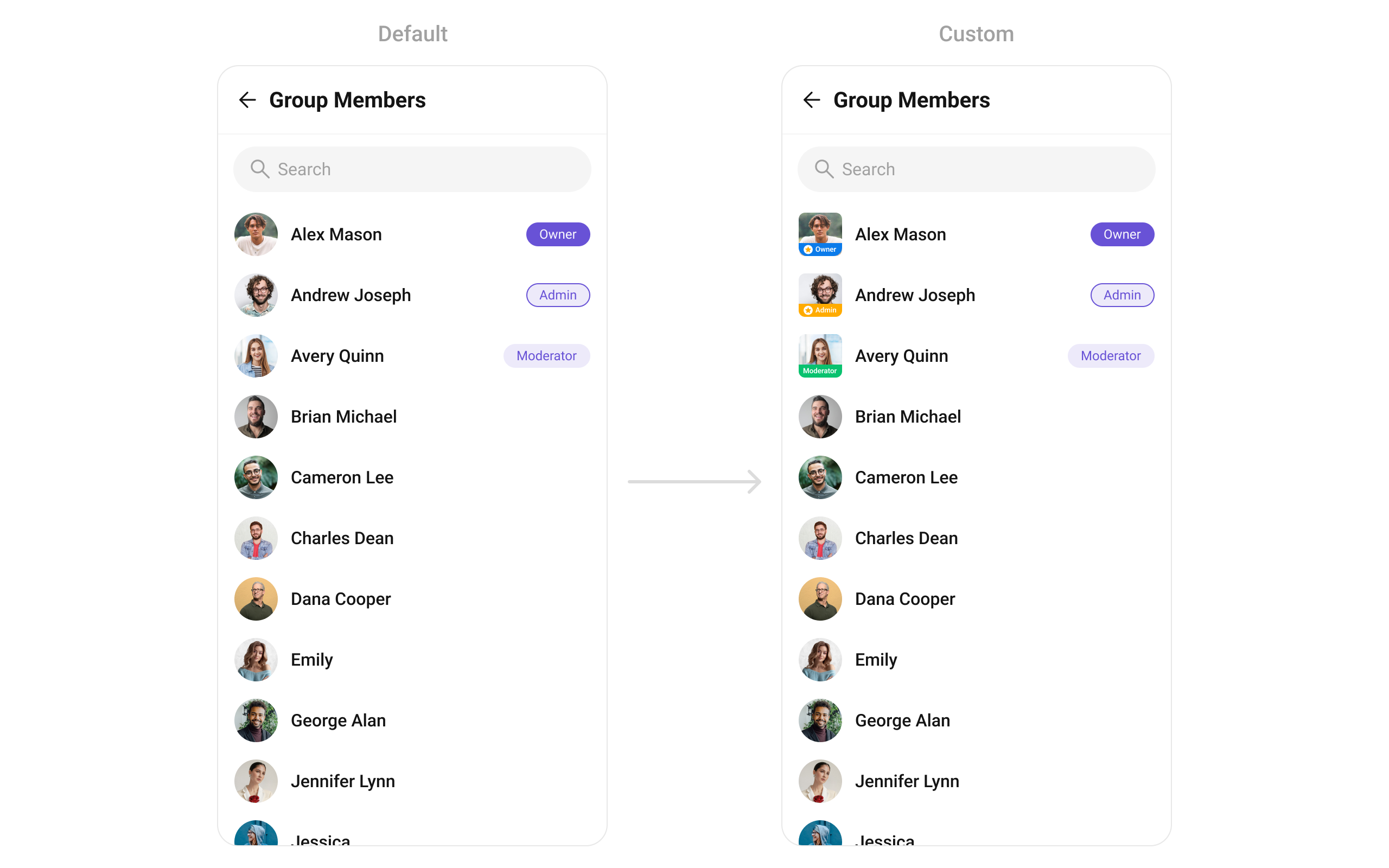
setLeadingView
Sets a custom leading view for each group member item, used for profile images or avatars.
- Java
- Kotlin
What this does: Registers aUsersViewHolderListenerthat provides a custom view for the leading (left) area of each group member item.createViewinflates your layout, andbindViewpopulates it with user data.
custom_title_view.xml:
custom_title_view.xml
What this does: Defines a custom leading view layout with a CometChatAvatar and a role badge view that can display different backgrounds based on the member’s scope (admin, moderator, participant).
Inflate the layout inside createView() of GroupMembersViewHolderListeners and use bindView() to set the avatar and role badge based on the member’s scope:
- Java
- Kotlin
YourActivity.java
What this does: Inflates a custom leading view layout and populates it with the group member’s avatar and a role-based badge. If the member is an admin, the badge shows themarketing_headdrawable; if a moderator,sr_manager; if a participant,content_manager; otherwise,team_member. The view is sized to 40dp × 40dp.
setTitleView
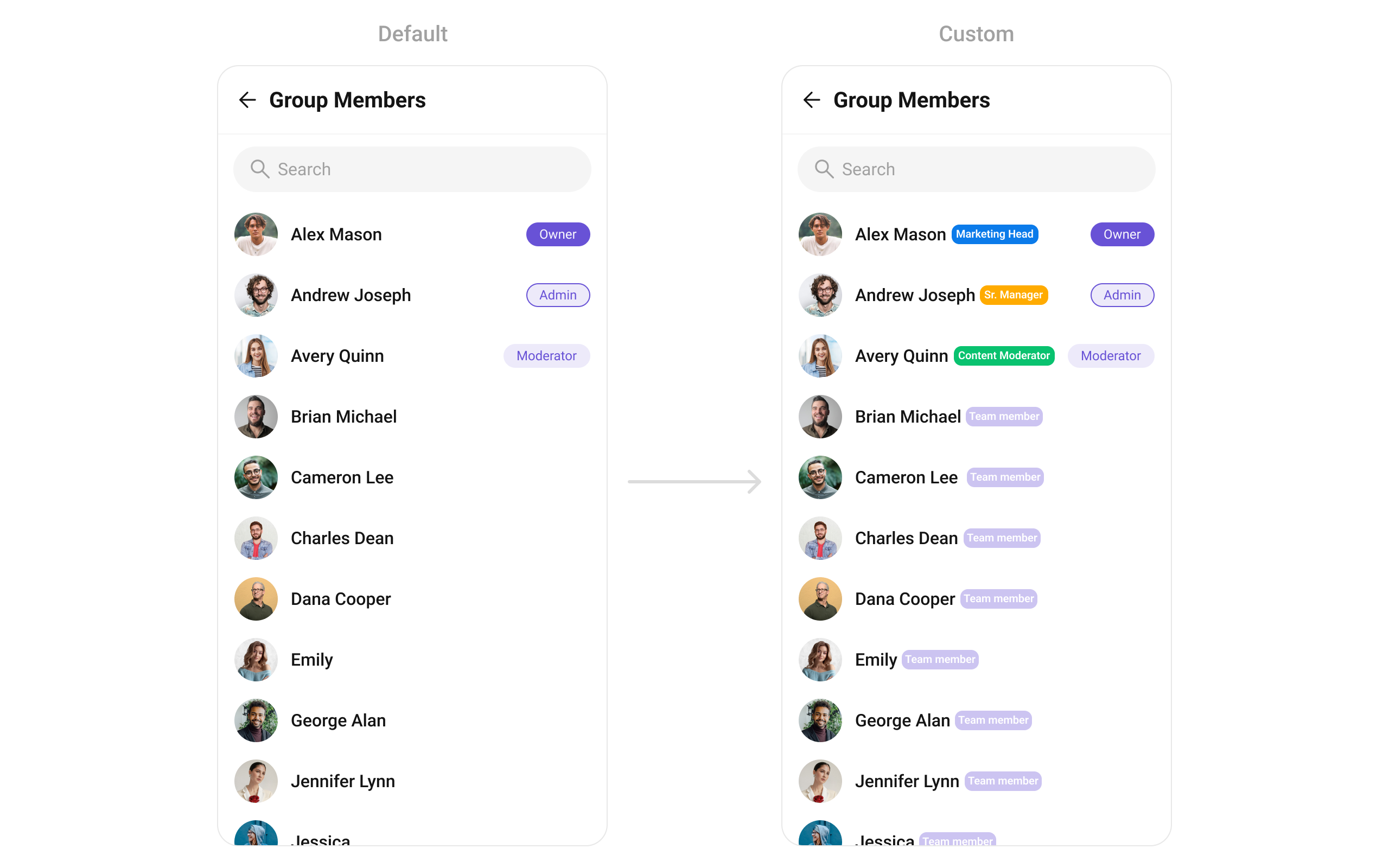
Customizes the title view, displaying the member’s name.
- Java
- Kotlin
What this does: Registers aUsersViewHolderListenerthat provides a custom view for the title area of each group member item.createViewinflates your layout, andbindViewpopulates it with user data.
custom_title_view.xml:
custom_title_view.xml
What this does: Defines a custom title view layout with aInflate the layout insideTextViewfor the member name and aViewfor the role badge, arranged horizontally.
createView() of GroupMembersViewHolderListeners and use bindView() to set the name and role badge:
- Java
- Kotlin
YourActivity.java
What this does: Inflates a custom title view layout and populates it with the group member’s name and a role-based badge. The badge background changes based on the member’s scope:marketing_headfor admin,sr_managerfor moderator,content_managerfor participant, andteam_memberfor others.
setItemView
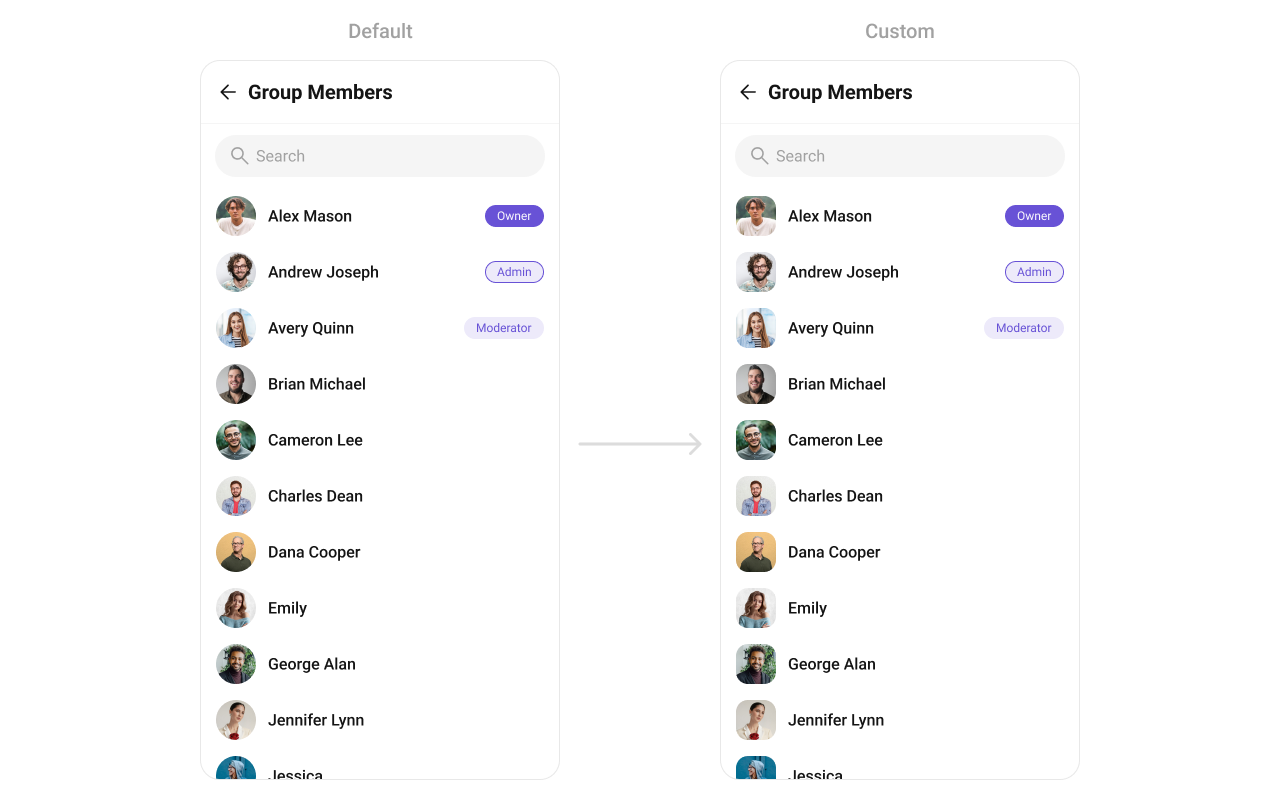
Assigns a fully custom list item layout to the Group Members component, replacing the default structure entirely.
- Java
- Kotlin
What this does: Registers aGroupMembersViewHolderListenersthat replaces the entire default group member list item layout.createViewinflates your custom layout, andbindViewpopulates it with group member data.
item_list.xml:
item_list.xml
What this does: Defines a custom list item layout with two TextView elements: one for the member name and one for the subtitle (scope), arranged vertically.
Inflate the layout inside createView() and use bindView() to set the name and scope:
- Java
- Kotlin
YourActivity.java
What this does: Inflates a custom list item layout and populates it with the group member’s name and scope. Each list item shows the member name in the primary text style and their scope (admin, moderator, participant) in the secondary text style.
setSubTitleView
Customizes the subtitle view for each group member, used for extra details such as join date.
- Java
- Kotlin
What this does: Registers aGroupMembersViewHolderListenersthat provides a custom view for the subtitle area of each group member item.createViewinflates your layout, andbindViewpopulates it with group member data.
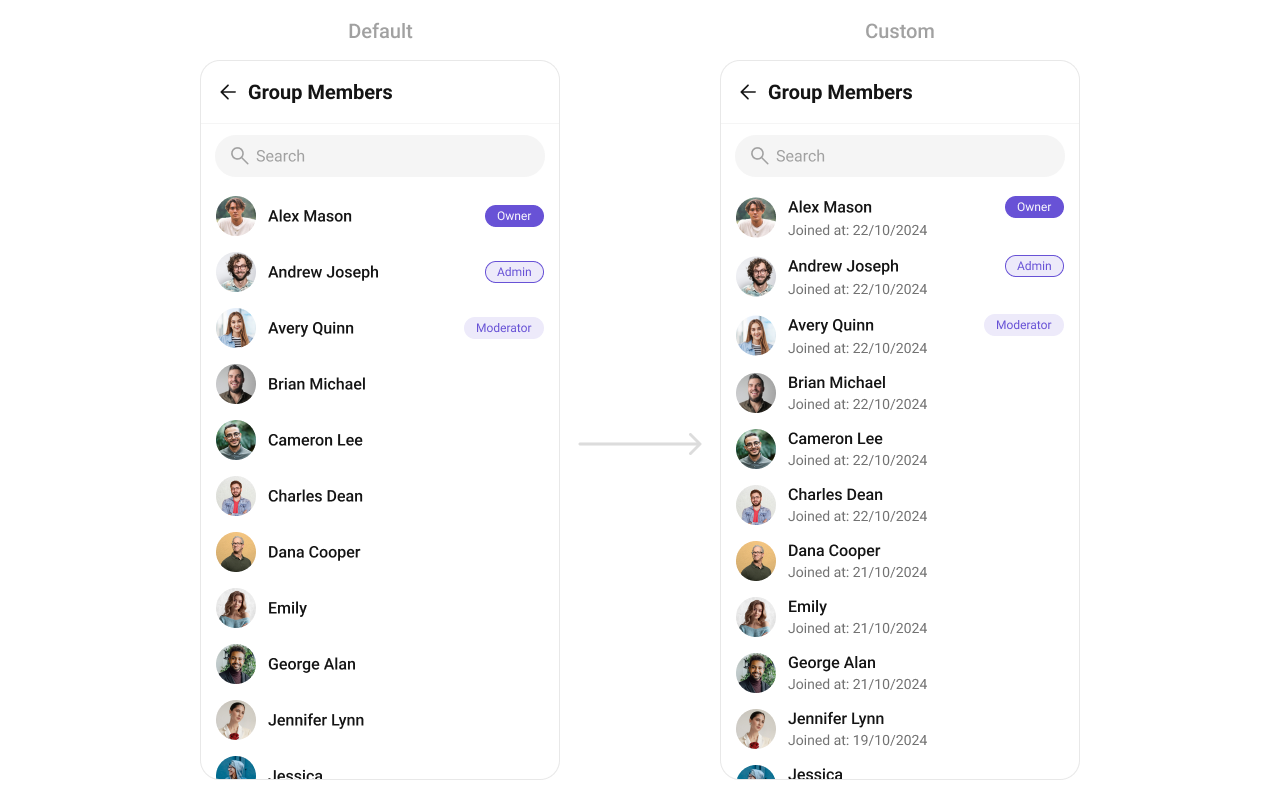
TextView in createView() and use bindView() to display the member’s join date:
- Java
- Kotlin
YourActivity.java
What this does: Creates aTextViewas the subtitle view and populates it with the group member’s join date formatted as “dd/mm/yyyy”. ThejoinedAttimestamp is multiplied by 1000 to convert from seconds to milliseconds.
setTrailingView
Customizes the trailing (right-end) section of each member item, used for action buttons or scope badges.
- Java
- Kotlin
What this does: Registers aGroupMembersViewHolderListenersthat provides a custom view for the trailing (right) area of each group member item.createViewinflates your layout, andbindViewpopulates it with group member data.
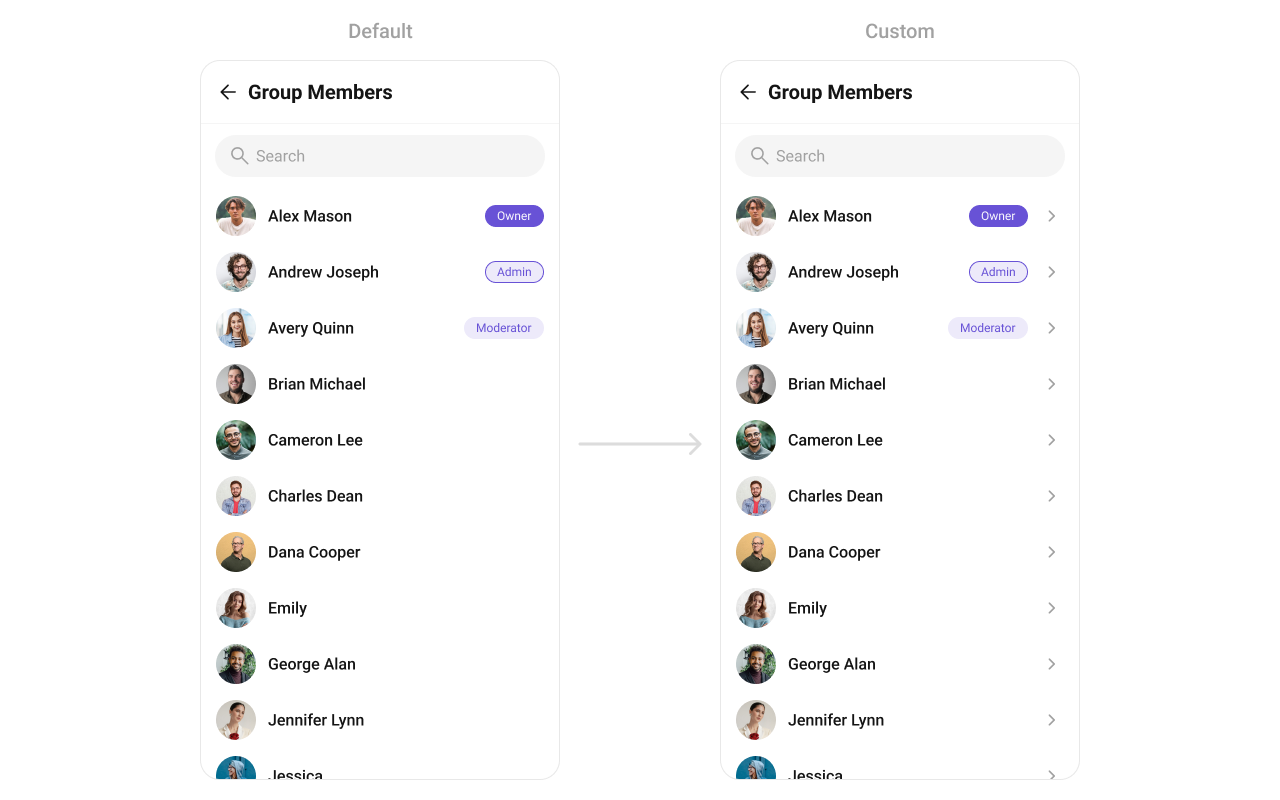
custom_tail_view.xml:
custom_tail_view.xml
What this does: Defines a custom trailing view layout with aInflate the layout and useMaterialCardViewcontaining aTextViewthat displays the member’s scope as a colored badge.
bindView() to set the scope text and visibility:
- Java
- Kotlin
YourActivity.java
What this does: Inflates a custom trailing view that displays a scope badge for each group member. The badge background uses the extended primary color, the text shows the member’s scope, and the badge is only visible for participants (hidden for admins, moderators, and owners).
setOverflowMenu
Customizes the overflow menu (three-dot ⋮ icon) with additional options in the toolbar.
- Java
- Kotlin
What this does: Sets a custom View as the overflow menu in the group members toolbar. Pass any view (e.g., an icon button) to replace the default overflow menu.
- Java
- Kotlin
What this does: Creates an ImageView with an add icon and sets it as the overflow menu in the group members toolbar. This provides a quick action button for adding new members.
- Verify: After setting any advanced view, confirm the custom view renders in the correct position within the group member list item, and the data binding populates correctly for each member.
Customization matrix
| What you want to change | Where | Property/API | Example |
|---|---|---|---|
| Avatar style (corner radius, background) | themes.xml | CometChatGroupMembersStyle with cometchatGroupMembersAvatarStyle | <item name="cometchatAvatarStrokeRadius">8dp</item> |
| Separator color | themes.xml | CometChatGroupMembersStyle with cometchatGroupMembersSeparatorColor | <item name="cometchatGroupMembersSeparatorColor">#F76808</item> |
| Title text color | themes.xml | CometChatGroupMembersStyle with cometchatGroupMembersTitleTextColor | <item name="cometchatGroupMembersTitleTextColor">#F76808</item> |
| Back icon tint | themes.xml | CometChatGroupMembersStyle with cometchatGroupMembersBackIconTint | <item name="cometchatGroupMembersBackIconTint">#F76808</item> |
| Apply a custom style | Activity/Fragment | setStyle(int styleRes) | cometchatGroupMembers.setStyle(R.style.CustomGroupMembersStyle); |
| Set the group | Activity/Fragment | setGroup(Group) | .setGroup(group); |
| Back button visibility | Activity/Fragment | setBackIconVisibility(int) | .setBackIconVisibility(View.VISIBLE); |
| Toolbar visibility | Activity/Fragment | setToolbarVisibility(int) | .setToolbarVisibility(View.GONE); |
| Error state visibility | Activity/Fragment | setErrorStateVisibility(int) | .setErrorStateVisibility(View.GONE); |
| Empty state visibility | Activity/Fragment | setEmptyStateVisibility(int) | .setEmptyStateVisibility(View.GONE); |
| Loading state visibility | Activity/Fragment | setLoadingStateVisibility(int) | .setLoadingStateVisibility(View.GONE); |
| Separator visibility | Activity/Fragment | setSeparatorVisibility(int) | .setSeparatorVisibility(View.GONE); |
| User online status visibility | Activity/Fragment | setUsersStatusVisibility(int) | .setUsersStatusVisibility(View.GONE); |
| Selection mode (single/multiple) | Activity/Fragment | setSelectionMode(SelectionMode) | .setSelectionMode(UIKitConstants.SelectionMode.MULTIPLE); |
| Search keyword | Activity/Fragment | setSearchkeyword(String) | .setSearchkeyword("anything"); |
| Search box visibility | Activity/Fragment | setSearchBoxVisibility(int) | .setSearchBoxVisibility(View.GONE); |
| Filter group members | Activity/Fragment | setGroupMembersRequestBuilder(GroupMembersRequestBuilder) | See Filters code above |
| Search request builder | Activity/Fragment | setSearchRequestBuilder(GroupMembersRequestBuilder) | See SearchRequestBuilder code above |
| Interaction options (replace) | Activity/Fragment | setOptions(Function2) | See setOptions code above |
| Interaction options (append) | Activity/Fragment | addOptions(Function2) | See addOptions code above |
| Loading view | Activity/Fragment | setLoadingView(int) | cometchatUsers.setLoadingView(R.layout.your_loading_view); |
| Empty view | Activity/Fragment | setEmptyView(int) | cometchatUsers.setEmptyView(R.layout.your_empty_view); |
| Error view | Activity/Fragment | setErrorView(int) | cometchatUsers.setErrorView(R.layout.your_empty_view); |
| Leading view (avatar area) | Activity/Fragment | setLeadingView(GroupMembersViewHolderListeners) | See setLeadingView code above |
| Title view | Activity/Fragment | setTitleView(GroupMembersViewHolderListeners) | See setTitleView code above |
| Subtitle view | Activity/Fragment | setSubtitleView(GroupMembersViewHolderListeners) | See setSubTitleView code above |
| Trailing view | Activity/Fragment | setTrailingView(GroupMembersViewHolderListeners) | See setTrailingView code above |
| Entire list item | Activity/Fragment | setItemView(GroupMembersViewHolderListeners) | See setItemView code above |
| Overflow menu | Activity/Fragment | setOverflowMenu(View) | cometchatGroupMembers.setOverflowMenu(v); |
Common pitfalls & fixes
| Pitfall | Fix |
|---|---|
| Component does not render | Ensure CometChatUIKit.init() is called and awaited before using any UI Kit component. If init() has not completed, the component will not load data. |
| Group member list is empty despite having members | Verify that setGroup(group) is called with a valid Group object that has a correct GUID. The component requires a group to fetch members. |
setGroup not called | setGroup is a required property. If you define CometChatGroupMembers in XML, you must still call setGroup() programmatically in your Activity or Fragment. |
| Filters not applied | Ensure you call setGroupMembersRequestBuilder(builder) on the CometChatGroupMembers instance after creating and configuring the builder. |
| Custom style not visible | Verify the style parent is CometChatGroupMembersStyle and that you call setStyle(R.style.YourStyle) on the component instance. |
| Event listener not receiving events | Ensure you call CometChatGroupEvents.addGroupListener with a unique LISTENER_ID. If you use the same ID as another listener, the previous one is replaced. |
Custom view returns null in createView | If createView returns null, the default view is used. Return a valid inflated View to replace the default. |
| Scope badge not showing for participants | In the trailing view example, the badge is only visible when groupMember.getScope() equals UIKitConstants.GroupMemberScope.PARTICIPANTS. If you want it visible for all scopes, remove the visibility condition. |
| Search not working | Ensure you call setSearchRequestBuilder with a properly configured GroupMembersRequestBuilder that includes setSearchKeyword. |
FAQ
Q: How do I filter group members by scope (admin, moderator, participant)? A: Create aGroupMembersRequest.GroupMembersRequestBuilder, call setScopes(List<String>) with the desired scopes, and pass it to setGroupMembersRequestBuilder.
Q: How do I listen for member kick, ban, or scope change events outside the component?
A: Use CometChatGroupEvents.addGroupListener("YOUR_TAG", ...) and override ccGroupMemberKicked, ccGroupMemberBanned, or ccGroupMemberScopeChanged. Call CometChatGroupEvents.removeListener("YOUR_TAG") to unsubscribe.
Q: Can I show a custom badge for each member’s role?
A: Yes. Use setLeadingView or setTitleView with a GroupMembersViewHolderListeners implementation. In bindView, check groupMember.getScope() against UIKitConstants.GroupMemberScope.ADMIN, UIKitConstants.GroupMemberScope.MODERATOR, and UIKitConstants.GroupMemberScope.PARTICIPANTS to set different badge backgrounds.
Q: How do I customize the avatar and separator styles?
A: Define custom styles with parent CometChatAvatarStyle in themes.xml, reference them in a CometChatGroupMembersStyle using cometchatGroupMembersAvatarStyle, and apply with setStyle().
Q: How do I add custom options without removing the defaults?
A: Use addOptions instead of setOptions. addOptions appends your custom MenuItem objects to the existing default options.