

CometChatThreadHeader displays the parent message and the number of replies in a thread. It provides context for threaded conversations, showing the original message bubble along with a reply count indicator.

When to use this
- You need to display the parent message at the top of a threaded message view.
- You want to show the number of replies in a thread.
- You need to customize the appearance of incoming and outgoing message bubbles in the thread header.
- You want to control the visibility of reply counts, receipts, or avatars in the thread header.
- You need to set custom date or time formats for the parent message display.
Prerequisites
- CometChat SDK initialized with
CometChatUIKit.init()and a user logged in. - The
cometchat-chat-uikit-androiddependency added to your project. - A valid
layout_activity.xmlor Activity/Fragment where you will place the component. - A
BaseMessageobject representing the parent message to display in the thread header.
Quick start
- Open your layout XML file (e.g.,
layout_activity.xml). - Add the
CometChatThreadHeaderXML element:
layout_activity.xml
What this does: Adds the CometChatThreadHeader component to your layout. It fills the available width and wraps its height to fit the parent message bubble and reply count.
- In your Activity or Fragment, get a reference to the component and set the parent message:
- Java
- Kotlin
YourActivity.java
What this does: Retrieves the CometChatThreadHeader from the layout and sets the parent message. The component renders the parent message bubble and displays the reply count for that thread.
- Build and run your app.
- Verify that the thread header displays the parent message bubble and the reply count.
Core concepts
CometChatThreadHeader: The main component class that renders the parent message and reply count in a threaded message view. It can be added via XML layout.- Style: XML theme styles (parent
CometChatThreadHeaderStyle) applied viasetStyle()to customize colors, message bubble styles, and reply count appearance. - Functionality methods: Methods like
setParentMessage,setReceiptsVisibility,setReplyCountVisibility,setAlignment,setDateFormat, andsetTimeFormatthat let you configure the component behavior. - Templates: Use
setTemplatesoraddTemplateto configure custom message templates for the thread header bubble. - Text formatters: Use
setTextFormattersto add custom text formatting to the thread header message content.
Implementation
Style
What you’re changing: The visual appearance of the thread header component using XML theme styles.- Where:
themes.xmlfor style definitions, and your Activity/Fragment for applying the style. - Applies to:
CometChatThreadHeader. - Default behavior: The component uses the default
CometChatThreadHeaderStyle. - Override: Define a custom style with parent
CometChatThreadHeaderStyleinthemes.xml, then callsetStyle()on the component.
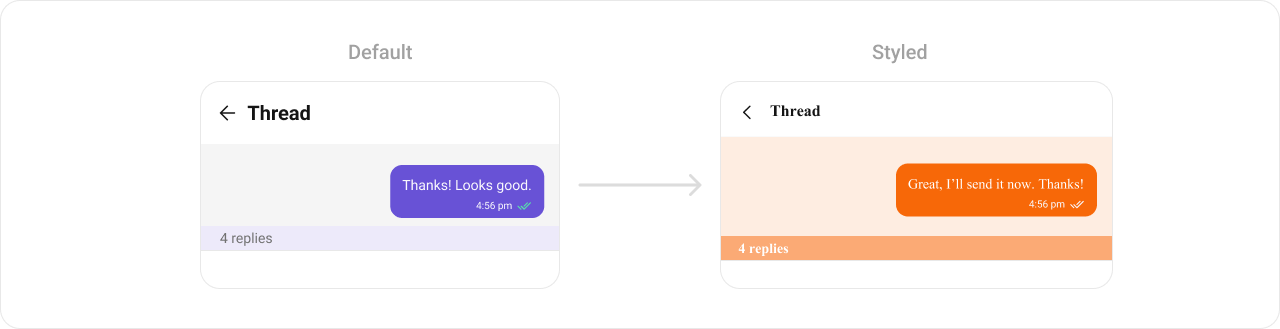
- Code:
themes.xml
What this does: Defines three custom styles:CustomOutgoingMessageBubbleStyleandCustomIncomingMessageBubbleStyleset the message bubble background color to#F76808;CustomThreadHeaderStyleapplies both bubble styles to the thread header, sets the header background to#FEEDE1, and sets the reply count text color to#F76808with a#FEEDE1background.
- Java
- Kotlin
What this does: Applies theTo know more such attributes, visit the attributes file.CustomThreadHeaderStyletheme to theCometChatThreadHeadercomponent, changing the message bubble colors, header background, and reply count appearance.
- Verify: The thread header displays with an orange (
#F76808) message bubble background, a light orange (#FEEDE1) header background, and orange reply count text.
Functionality
What you’re changing: Small functional customizations such as setting the parent message, toggling visibility of UI elements, configuring alignment, and setting date/time formats.- Where: Activity or Fragment where you hold a reference to
CometChatThreadHeader. - Applies to:
CometChatThreadHeader. - Default behavior: The component displays the parent message with default alignment, visible receipts, reply count, reply count bar, and avatar.
- Override: Call the corresponding method on the component instance.
- Java
- Kotlin
What this does: Retrieves a reference to the thread header component from the layout so you can call customization methods on it.
| Methods | Description | Code |
|---|---|---|
setParentMessage | Used to set the message for which the replies need to be fetched | .setParentMessage(BaseMessage) |
setIncomingMessageBubbleStyle | Used to set Incoming Bubble style | .setIncomingMessageBubbleStyle(@StyleRes int) |
setOutgoingMessageBubbleStyle | Used to set Outgoing Bubble style | .setOutgoingMessageBubbleStyle(@StyleRes int) |
setReceiptsVisibility | Used to hide Receipt from Message Bubble | setReceiptsVisibility(View.GONE) |
setReplyCountVisibility | Used to hide reply count from the component | setReplyCountVisibility(View.GONE) |
setReplyCountBarVisibility | Used to hide reply count bar from component | setReplyCountBarVisibility(View.GONE) |
setAlignment | Used to set the bubble alignment: either leftAligned or standard. If set to standard, the bubble will appear on the left or right based on the message type (incoming or outgoing). If set to leftAligned, all message bubbles will appear on the left regardless of their type. | setAlignment(UIKitConstants.MessageListAlignment alignment) |
setAvatarVisibility | Shows or hides the avatar in the Thread Header. | setAvatarVisibility(true) |
setDateFormat | Sets the date pattern for displaying message dates in the Thread Header. | setDateFormat(new SimpleDateFormat("MMM dd, yyyy",Locale.getDefault())) |
setTimeFormat | Sets the date pattern for displaying message dates in the Thread Header. | setDateFormat(new SimpleDateFormat("hh:mm a",Locale.getDefault())) |
addTemplate | Adds a new message template to the existing list of templates to the Thread Header. | addTemplate(CometChatMessageTemplate template) |
setTemplates | Replace the default list of message template and sets a new list. | setTemplates(List<CometChatMessageTemplate> cometchatMessageTemplates) |
setTextFormatters | This method allows the addition of custom text formatters to the current list of formatters used in the Thread Header. | setTextFormatters(List<CometChatTextFormatter> cometchatTextFormatters) |
- Verify: After calling
setParentMessage(baseMessage), the thread header displays the parent message bubble. After callingsetReplyCountVisibility(View.GONE), the reply count is hidden. After callingsetAlignment(UIKitConstants.MessageListAlignment.LEFT_ALIGNED), all message bubbles appear on the left side.
Advanced views
What you’re changing: The message templates used to render the parent message bubble in the thread header.- Where: Activity or Fragment where you hold a reference to
CometChatThreadHeader. - Applies to:
CometChatThreadHeader. - Default behavior: The component uses the default set of message templates to render the parent message bubble.
- Override: Call
setTemplatesto replace the default list of message templates, or calladdTemplateto add a new template to the existing list.
setTemplates method is used to configure and set a list of templates for message bubbles. It allows for dynamic customization of message appearance, content, or other predefined settings based on the templates provided. Call setTemplates to update or apply a new set of templates to the thread header.
- Verify: After calling
setTemplateswith a custom list ofCometChatMessageTemplateobjects, the parent message bubble in the thread header renders using the custom template configuration.
Customization matrix
| What you want to change | Where | Property/API | Example |
|---|---|---|---|
| Outgoing message bubble style | themes.xml | CometChatThreadHeaderStyle with cometchatThreadHeaderOutgoingMessageBubbleStyle | <item name="cometchatThreadHeaderOutgoingMessageBubbleStyle">@style/CustomOutgoingMessageBubbleStyle</item> |
| Incoming message bubble style | themes.xml | CometChatThreadHeaderStyle with cometchatThreadHeaderIncomingMessageBubbleStyle | <item name="cometchatThreadHeaderIncomingMessageBubbleStyle">@style/CustomIncomingMessageBubbleStyle</item> |
| Header background color | themes.xml | CometChatThreadHeaderStyle with cometchatThreadHeaderBackgroundColor | <item name="cometchatThreadHeaderBackgroundColor">#FEEDE1</item> |
| Reply count text color | themes.xml | CometChatThreadHeaderStyle with cometchatThreadHeaderReplyCountTextColor | <item name="cometchatThreadHeaderReplyCountTextColor">#F76808</item> |
| Reply count background color | themes.xml | CometChatThreadHeaderStyle with cometchatThreadHeaderReplyCountBackgroundColor | <item name="cometchatThreadHeaderReplyCountBackgroundColor">#FEEDE1</item> |
| Message bubble background color | themes.xml | CometChatOutgoingMessageBubbleStyle / CometChatIncomingMessageBubbleStyle with cometchatMessageBubbleBackgroundColor | <item name="cometchatMessageBubbleBackgroundColor">#F76808</item> |
| Apply a custom style | Activity/Fragment | setStyle(int styleRes) | cometChatThreadHeader.setStyle(R.style.CustomThreadHeaderStyle); |
| Parent message | Activity/Fragment | setParentMessage(BaseMessage) | .setParentMessage(baseMessage) |
| Incoming bubble style (programmatic) | Activity/Fragment | setIncomingMessageBubbleStyle(@StyleRes int) | .setIncomingMessageBubbleStyle(R.style.CustomIncomingMessageBubbleStyle) |
| Outgoing bubble style (programmatic) | Activity/Fragment | setOutgoingMessageBubbleStyle(@StyleRes int) | .setOutgoingMessageBubbleStyle(R.style.CustomOutgoingMessageBubbleStyle) |
| Receipt visibility | Activity/Fragment | setReceiptsVisibility(int) | setReceiptsVisibility(View.GONE) |
| Reply count visibility | Activity/Fragment | setReplyCountVisibility(int) | setReplyCountVisibility(View.GONE) |
| Reply count bar visibility | Activity/Fragment | setReplyCountBarVisibility(int) | setReplyCountBarVisibility(View.GONE) |
| Bubble alignment | Activity/Fragment | setAlignment(UIKitConstants.MessageListAlignment) | setAlignment(UIKitConstants.MessageListAlignment alignment) |
| Avatar visibility | Activity/Fragment | setAvatarVisibility(boolean) | setAvatarVisibility(true) |
| Date format | Activity/Fragment | setDateFormat(SimpleDateFormat) | setDateFormat(new SimpleDateFormat("MMM dd, yyyy",Locale.getDefault())) |
| Time format | Activity/Fragment | setTimeFormat(SimpleDateFormat) | setDateFormat(new SimpleDateFormat("hh:mm a",Locale.getDefault())) |
| Message templates (replace) | Activity/Fragment | setTemplates(List<CometChatMessageTemplate>) | setTemplates(List<CometChatMessageTemplate> cometchatMessageTemplates) |
| Message templates (add) | Activity/Fragment | addTemplate(CometChatMessageTemplate) | addTemplate(CometChatMessageTemplate template) |
| Text formatters | Activity/Fragment | setTextFormatters(List<CometChatTextFormatter>) | setTextFormatters(List<CometChatTextFormatter> cometchatTextFormatters) |
Common pitfalls & fixes
| Pitfall | Fix |
|---|---|
| Component does not render | Ensure CometChatUIKit.init() is called and awaited before using any UI Kit component. If init() has not completed, the component will not load data. |
| Thread header shows no message | Ensure you call setParentMessage(baseMessage) with a valid BaseMessage object. If no parent message is set, the thread header has no message to display. |
| Custom style not visible | Verify the style parent is CometChatThreadHeaderStyle and that you call setStyle(R.style.YourStyle) on the component instance. |
| Reply count not showing | Ensure setReplyCountVisibility is not set to View.GONE. If the parent message has no replies, the reply count may not appear. |
| Bubble alignment not changing | Ensure you pass a valid UIKitConstants.MessageListAlignment value to setAlignment. If set to standard, the bubble position depends on whether the message is incoming or outgoing. |
| Message bubble style not applied | If you set setIncomingMessageBubbleStyle or setOutgoingMessageBubbleStyle programmatically, ensure the style resource ID points to a valid style with parent CometChatIncomingMessageBubbleStyle or CometChatOutgoingMessageBubbleStyle. |
| Date or time format not changing | Ensure you pass a valid SimpleDateFormat object to setDateFormat or setTimeFormat. If the format pattern is invalid, the default format is used. |
| Custom templates not rendering | If you call setTemplates with an empty list, no message bubble renders. Ensure the list contains at least one valid CometChatMessageTemplate. |
FAQ
Q: How do I set the parent message for the thread header? A: CallsetParentMessage(baseMessage) on the CometChatThreadHeader instance, passing a valid BaseMessage object that represents the parent message of the thread.
Q: How do I hide the reply count and reply count bar?
A: Call setReplyCountVisibility(View.GONE) to hide the reply count text, and call setReplyCountBarVisibility(View.GONE) to hide the reply count bar.
Q: How do I customize the message bubble colors in the thread header?
A: Define custom styles with parents CometChatOutgoingMessageBubbleStyle and CometChatIncomingMessageBubbleStyle in themes.xml, reference them in a CometChatThreadHeaderStyle, and apply with setStyle().
Q: How do I change the bubble alignment so all bubbles appear on the left?
A: Call setAlignment with UIKitConstants.MessageListAlignment set to left-aligned. If set to standard, the bubble position depends on whether the message is incoming or outgoing.
Q: Can I add custom message templates to the thread header?
A: Yes. Use addTemplate(CometChatMessageTemplate template) to add a single template to the existing list, or use setTemplates(List<CometChatMessageTemplate>) to replace the entire template list.