

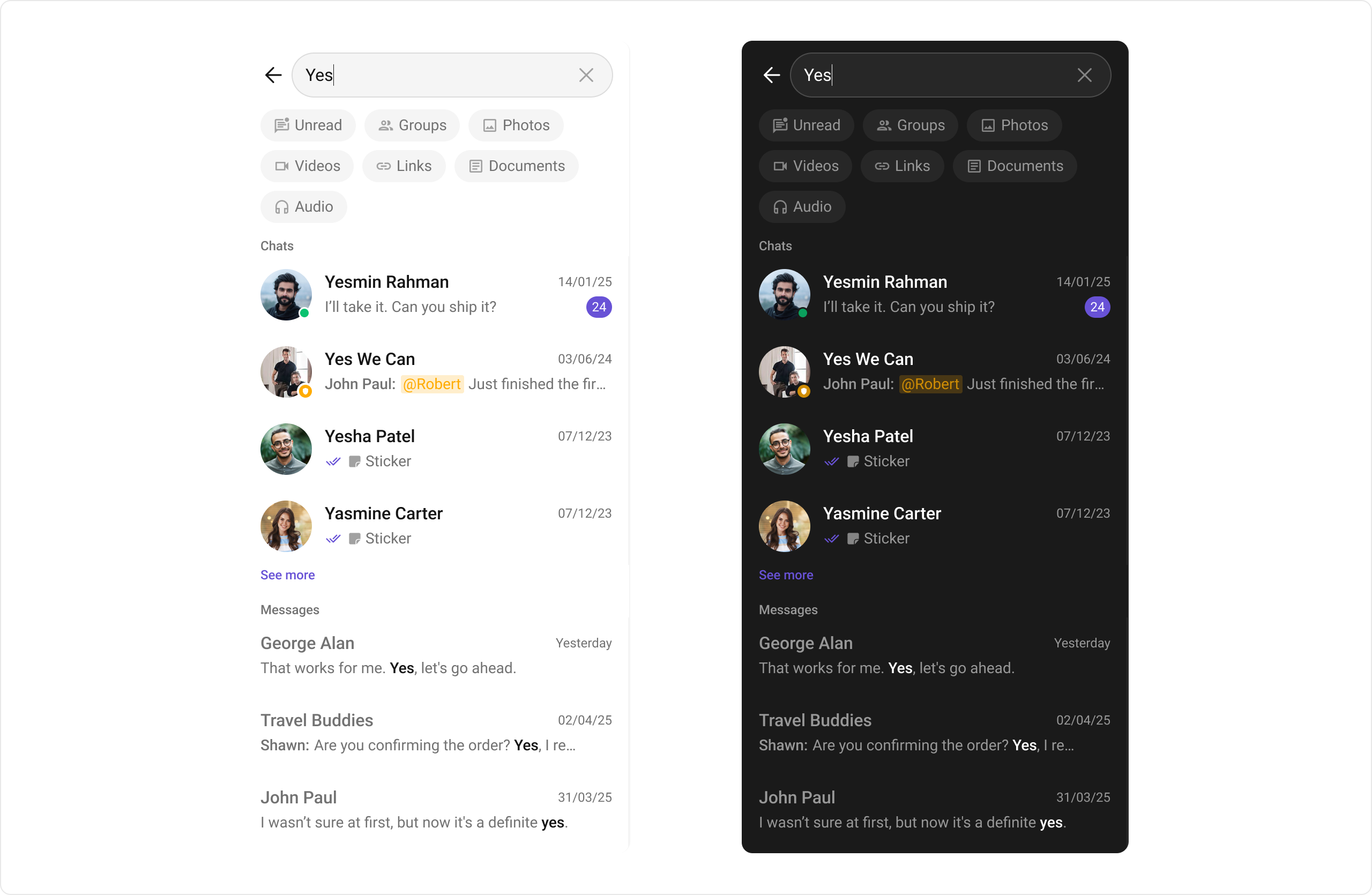
CometChatSearch is a composite component that provides a real-time search interface for finding conversations and messages, with support for filters, scopes, and customization options.
When to use this
- You need a full-screen or embedded search experience that searches across conversations and messages.
- You want users to find messages, conversations, media, and more through a filterable search interface.
- You need to scope search results to a specific user or group conversation.
- You want to customize search filters, result item views, and date/time formatting.
- You need tap actions on search results for both conversations and messages.
Prerequisites
- CometChat SDK initialized with
CometChatUIKit.init()and a user logged in. - The
cometchat-chat-uikit-androiddependency added to your project. - A valid layout XML file or Activity where you will place the component.
Quick start
- Open your layout XML file (e.g.,
activity_search.xml). - Add the
CometChatSearchXML element:
activity_search.xml
What this does: Adds theCometChatSearchcomponent to your layout inside aConstraintLayout. It fills the available width and height and renders the search interface for the logged-in user.
- Create your Activity class and set up view binding:
- Java
- Kotlin
SearchActivity.java
What this does: Creates aSearchActivitythat inflates the layout using view binding and sets it as the content view. TheCometChatSearchcomponent defined in the XML renders automatically.
- Build and run your app.
- Verify that the search interface appears with a search bar and filter options.
Core concepts
CometChatSearch: The main composite component class that renders the search interface. It searches across conversations and messages in real time.- Actions: Callbacks such as
setOnConversationClicked,setOnMessageClicked,setOnBackPressListener,setOnError, andsetOnEmptythat let you respond to user interactions and component states. - Filters: Use
ConversationsRequest.ConversationsRequestBuilderandMessagesRequest.MessagesRequestBuilderto filter search results by conversation or message criteria. - Events: The
CometChatSearchcomponent does not produce any events. - Style: XML theme styles (parent
CometChatSearchStyle) applied viasetStyle()to customize colors, fonts, and sub-component styles. - Advanced views: Methods like
setTextMessageItemView,setImageMessageItemView, and conversation view setters that let you replace default UI elements with custom layouts. - Functionality: Methods like
setUid,setGuid,setSearchFilters,setInitialSearchFilter, andsetSearchInthat control search scope and behavior.
Implementation
Actions
What you’re changing: How the component responds to user interactions such as tapping a conversation result, tapping a message result, pressing back, encountering errors, or receiving empty results.- Where: Activity where you hold a reference to
CometChatSearchvia view binding (e.g.,binding.cometchatSearch). - Applies to:
CometChatSearch. - Default behavior: The
onConversationClickedandonMessageClickedactions do not have predefined behavior. TheonBackPressListener,onError, andonEmptyactions listen for their respective states. - Override: Call the corresponding setter method to define your own logic.
setOnConversationClicked
Triggered when the user taps a conversation from the search results.
- Java
- Kotlin
SearchActivity.java
What this does: Registers a callback that fires when the user taps a conversation in the search results. The callback receives the view, position, and Conversation object.
setOnMessageClicked
Triggered when the user taps a message from the search results.
- Java
- Kotlin
SearchActivity.java
What this does: Registers a callback that fires when the user taps a message in the search results. The callback receives the view, position, and BaseMessage object.
setOnBackPressListener
Triggered when the user taps the back button of the search component.
- Java
- Kotlin
SearchActivity.java
What this does: Registers a callback that fires when the user presses the back button on the search screen. Use this to define custom back navigation logic.
setOnError
Listens for errors that occur in the CometChatSearch component. This does not change the component’s behavior.
- Java
- Kotlin
SearchActivity.java
What this does: Registers an error listener on the search component. When an error occurs during search operations, the callback fires with the exception object.
setOnEmpty
Listens for the empty state of the CometChatSearch component. This does not change the component’s behavior.
- Java
- Kotlin
SearchActivity.java
What this does: Registers a callback that fires when the search returns no results. Use this to trigger custom empty-state logic.
- Verify: After setting any action callback, trigger the corresponding interaction (tap a conversation result, tap a message result, press back, cause an error, or search for a term with no results) and confirm your callback executes with the correct parameters.
Filters
What you’re changing: How search results are filtered using request builders for conversations and messages.- Where: Activity where you hold a reference to
CometChatSearchvia view binding (e.g.,binding.cometchatSearch). - Applies to:
CometChatSearch. - Default behavior: The component uses default request builders with no custom filters applied.
- Override: Call
setConversationsRequestBuilderorsetMessagesRequestBuilderwith a configured builder to filter results.
setConversationsRequestBuilder
Sets a ConversationsRequest.ConversationsRequestBuilder to filter conversation search results. For all available builder options, refer to the ConversationRequestBuilder documentation.
- Java
- Kotlin
SearchActivity.java
What this does: Configures the search component to use a custom ConversationsRequestBuilder that limits conversation results to 10 items per fetch.
setMessagesRequestBuilder
Sets a MessagesRequest.MessagesRequestBuilder to filter message search results. For all available builder options, refer to the MessagesRequestBuilder documentation.
- Java
- Kotlin
SearchActivity.java
What this does: Configures the search component to use a custom MessagesRequestBuilder that limits message results to 5 items per fetch.
- Verify: After setting a request builder, perform a search and confirm the results respect the configured filters (e.g., the result count does not exceed the set limit).
Events
TheCometChatSearch component does not produce any events.
Style
What you’re changing: The visual appearance of the search component including background colors, text styles, and sub-component styles.- Where:
themes.xmlfor style definition, Activity/Fragment for applying the style. - Applies to:
CometChatSearch. - Default behavior: The component uses the default
CometChatSearchStyletheme. - Override: Define a custom style with parent
CometChatSearchStyleinthemes.xmland apply it withsetStyle(). - Code:
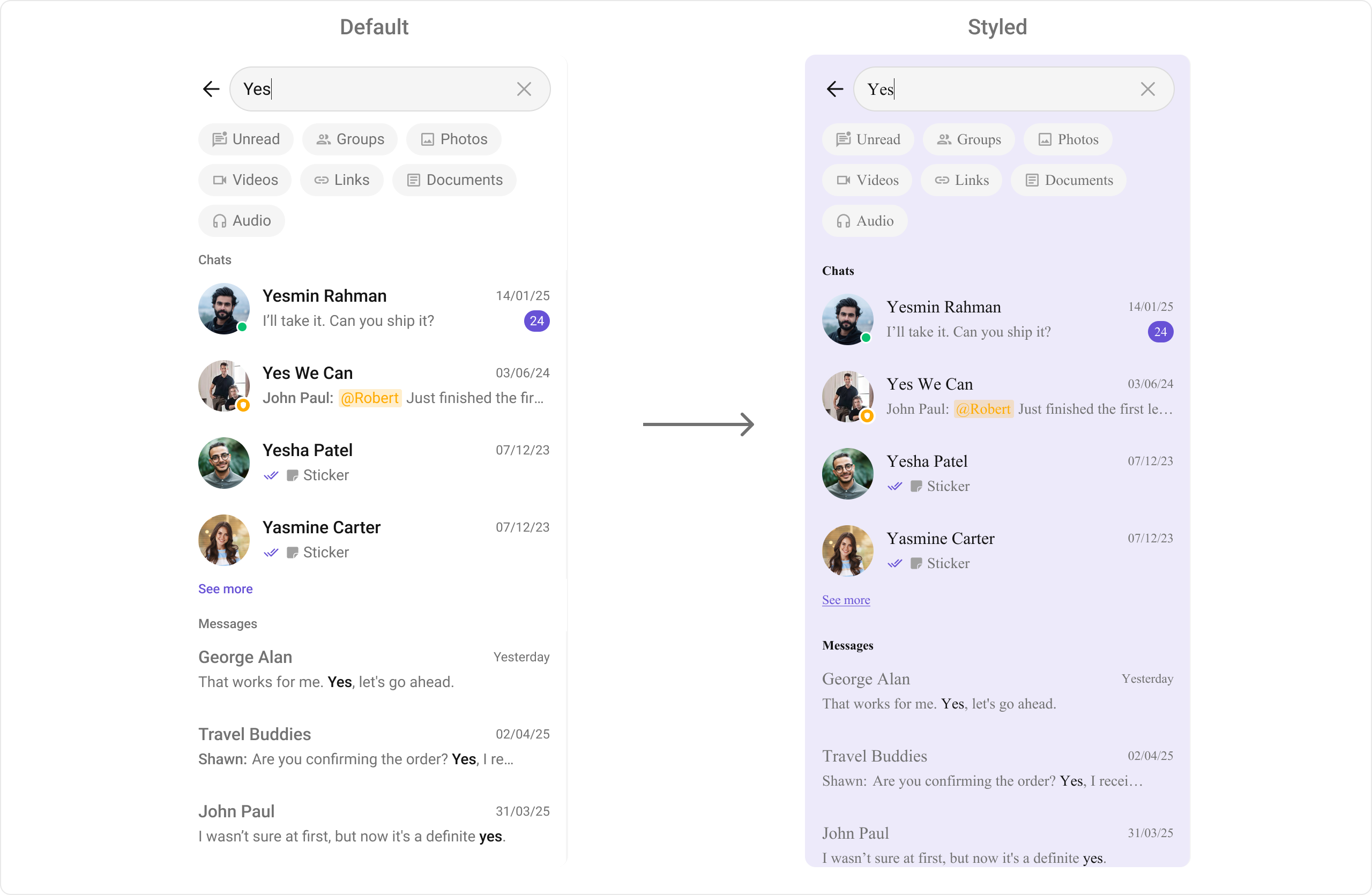
themes.xml
What this does: Defines a custom search style that sets a light purple background color (#EDEAFA) for the search component, conversation items, and message items, and applies a Times New Roman font to all text elements including filter chips, section headers, conversation titles/subtitles, message titles/subtitles, timestamps, “see more” text, and the search bar.
Apply the style to the component:
- Java
- Kotlin
What this does: Applies theTo view all available style attributes, visit the attributes file.CustomSearchStyletheme to theCometChatSearchinstance, overriding the default visual appearance with your custom colors and fonts.
- Verify: After applying the custom style, the search component displays with the specified background color and font styles for all text elements.
Functionality
What you’re changing: Functional behavior of the search component including search scope, filters, visibility toggles, and custom state views.- Where: Activity where you hold a reference to
CometChatSearchvia view binding (e.g.,binding.cometchatSearch). - Applies to:
CometChatSearch. - Default behavior: The component searches across all conversations and messages with default filters and views.
- Override: Call the corresponding setter method to change the behavior.
| Property | Description | Code |
|---|---|---|
| User | The UID of the user in whose conversation the search will be performed. | .setUid(String uid) |
| Group | The GUID of the group in whose conversation the search will be performed. | .setGuid(String guid) |
| Hide User Status | Hides the user’s online/offline status indicator. | .setHideUserStatus(boolean bool) |
| Hide Group Type | Hides the group type icon in conversation leading view. | .setHideGroupType(boolean hide) |
| Search Filters | List of filters to be rendered in the Search component. | .setSearchFilters(List<UIKitConstants.SearchFilter> filters) |
| Initial Search Filter | The filter which will be active by default on load. | .setInitialSearchFilter(UIKitConstants.SearchFilter initialSearchFilter) |
| Search In | List of entities in which the search should be performed. | .setSearchIn(List<SearchScope> scopes) |
| Initial View | Custom view to be shown when CometChat Search is rendered and no search is performed. | .setInitialView(@LayoutRes int initialView) |
| Loading View | A custom component to display during the loading state. | .setLoadingView(View loadingView) |
| Empty View | A custom component to display when there are no conversations available. | .setEmptyView(@LayoutRes int emptyView) |
| Error View | A custom component to display when an error occurs. | .setErrorView(View errorView) |
- Verify: After setting a functional property (e.g.,
setUid("user123")), perform a search and confirm the results are scoped to the specified user’s conversation.
Advanced views
What you’re changing: Custom views for conversation items and message items in the search results, date/time formatting, and text formatters.- Where: Activity where you hold a reference to
CometChatSearchvia view binding (e.g.,binding.cometchatSearch). - Applies to:
CometChatSearch. - Default behavior: The component uses default views for conversation and message items in search results.
- Override: Call the corresponding setter method to replace default views with custom layouts.
Conversation item views
The following methods let you customize conversation items in the search results. Each method references the corresponding prop on theCometChatConversations component:
- ConversationItemView: Assign a custom list item view to a conversation in the search result. For details, refer to the itemView prop of the
CometChatConversationscomponent. - ConversationLeadingView: Assign a custom leading view to a conversation in the search result. For details, refer to the leadingView prop of the
CometChatConversationscomponent. - ConversationTitleView: Assign a custom title view to a conversation in the search result. For details, refer to the titleView prop of the
CometChatConversationscomponent. - ConversationSubtitleView: Assign a custom subtitle view to a conversation in the search result. For details, refer to the subtitleView prop of the
CometChatConversationscomponent. - ConversationTrailingView: Assign a custom trailing view to a conversation in the search result. For details, refer to the trailingView prop of the
CometChatConversationscomponent.
Message item views
Message item view methods let you assign custom views to different types of messages in the search results. For details, refer to the itemView prop of theCometChatMessages component.
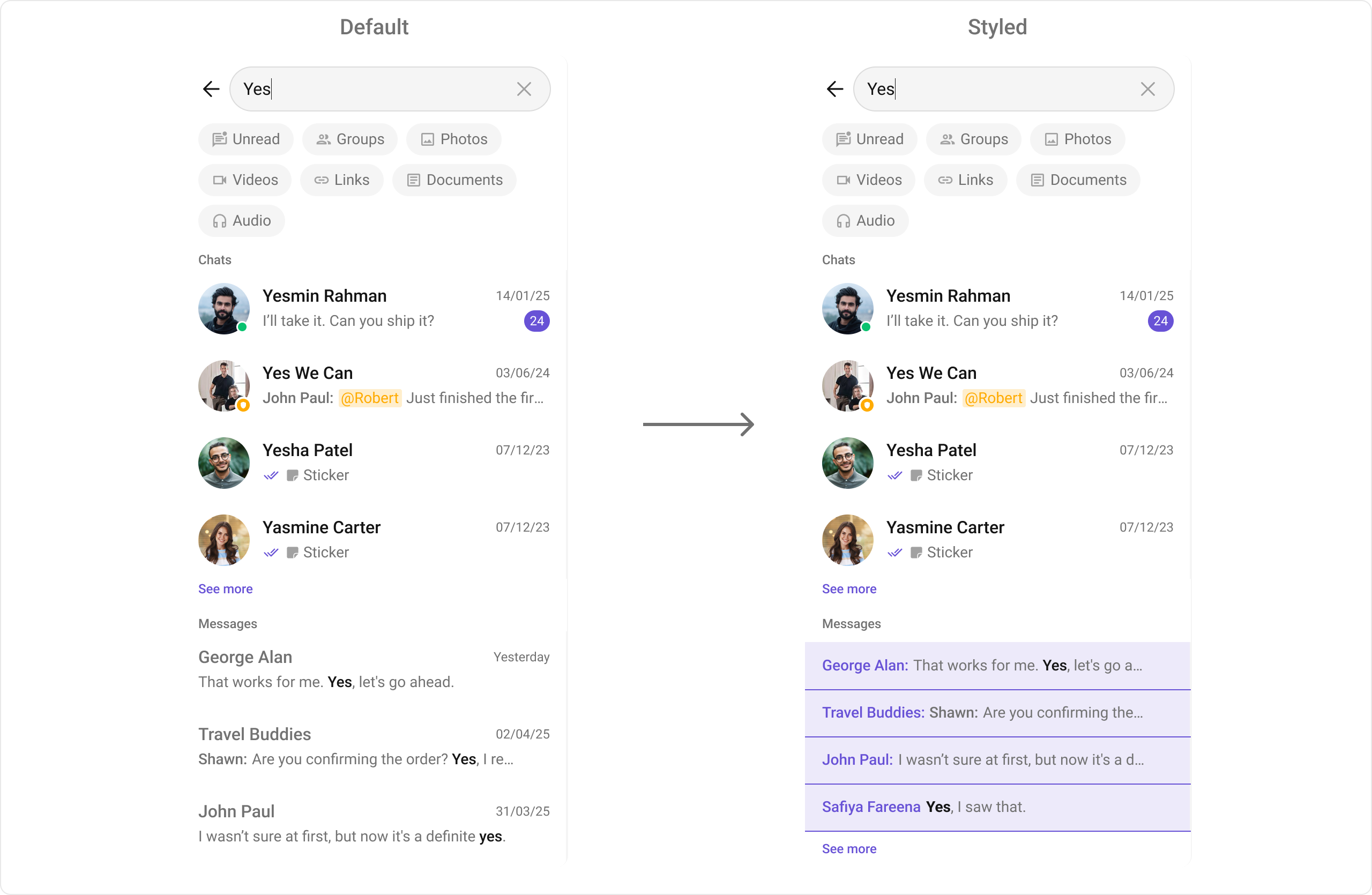
The following example shows how to override the default message item view with a custom one for text messages.
Define a custom layout XML:
- XML
What this does: Defines a custom horizontal layout for a message search result item with a bold purple sender name on the left and a single-line truncated message text on the right.Set the custom text message item view:
- Java
- Kotlin
What this does: Registers aMessagesSearchViewHolderListenerfor text messages. ThecreateViewmethod inflates the custom layout, andbindViewpopulates the sender name and message text from theTextMessageobject.
| Function | Message Type |
|---|---|
setTextMessageItemView | Text Message |
setImageMessageItemView | Image Message |
setVideoMessageItemView | Video Message |
setAudioMessageItemView | Audio Message |
setDocumentMessageItemView | Document Message |
setLinkMessageItemView | Link Message |
Date/time formatters
setDateTimeFormatter
Provides a custom implementation of DateTimeFormatterCallback to configure how time and date values are displayed in search results. Each method in the interface corresponds to a specific case:
time(long timestamp)— Custom full timestamp formattoday(long timestamp)— Called when a message is from todayyesterday(long timestamp)— Called for yesterday’s messageslastWeek(long timestamp)— Messages from the past weekotherDays(long timestamp)— Older messagesminute(long timestamp)/hour(long timestamp)— Exact time unitminutes(long diffInMinutesFromNow, long timestamp)— e.g., “5 minutes ago”hours(long diffInHourFromNow, long timestamp)— e.g., “2 hours ago”
- Java
- Kotlin
What this does: Provides a custom date/time formatter that displays “Today”, “Yesterday”, “Last Week” for recent messages, a “dd MMM yyyy” format for older messages, and relative time strings like “5 mins ago” or “2 hrs ago” for recent activity.
Text formatters
setTextFormatters
Enables developers to define and apply text formatters that dynamically modify or transform message content before rendering it in the UI. Text formatters can be used for:
- Automatically converting URLs into clickable links
- Applying Markdown or rich text styling
- Replacing certain words or patterns with emojis or predefined text
- Censoring specific words for moderation
- Verify: After setting any advanced view, confirm the custom view renders in the correct position within the search result items, and the data binding populates correctly for each result.
Customization matrix
| What you want to change | Where | Property/API | Example |
|---|---|---|---|
| Search background color | themes.xml | CometChatSearchStyle with cometchatSearchBackgroundColor | <item name="cometchatSearchBackgroundColor">#EDEAFA</item> |
| Filter chip text style | themes.xml | CometChatSearchStyle with cometchatSearchFilterChipTextAppearance | <item name="cometchatSearchFilterChipTextAppearance">@style/YourStyle</item> |
| Section header text style | themes.xml | CometChatSearchStyle with cometchatSearchSectionHeaderTextAppearance | <item name="cometchatSearchSectionHeaderTextAppearance">@style/YourStyle</item> |
| Section header background color | themes.xml | CometChatSearchStyle with cometchatSearchSectionHeaderBackgroundColor | <item name="cometchatSearchSectionHeaderBackgroundColor">#EDEAFA</item> |
| Conversation item background color | themes.xml | CometChatSearchStyle with cometchatSearchConversationItemBackgroundColor | <item name="cometchatSearchConversationItemBackgroundColor">#EDEAFA</item> |
| Conversation title text style | themes.xml | CometChatSearchStyle with cometchatSearchConversationTitleTextAppearance | <item name="cometchatSearchConversationTitleTextAppearance">@style/YourStyle</item> |
| Conversation subtitle text style | themes.xml | CometChatSearchStyle with cometchatSearchConversationSubtitleTextAppearance | <item name="cometchatSearchConversationSubtitleTextAppearance">@style/YourStyle</item> |
| Conversation timestamp text style | themes.xml | CometChatSearchStyle with cometchatSearchConversationTimestampTextAppearance | <item name="cometchatSearchConversationTimestampTextAppearance">?attr/cometchatTextAppearanceCaption1Bold</item> |
| ”See more” text style | themes.xml | CometChatSearchStyle with cometchatSearchSeeMoreTextAppearance | <item name="cometchatSearchSeeMoreTextAppearance">@style/YourStyle</item> |
| Message item background color | themes.xml | CometChatSearchStyle with cometchatSearchMessageItemBackgroundColor | <item name="cometchatSearchMessageItemBackgroundColor">#EDEAFA</item> |
| Message title text style | themes.xml | CometChatSearchStyle with cometchatSearchMessageTitleTextAppearance | <item name="cometchatSearchMessageTitleTextAppearance">@style/YourStyle</item> |
| Message subtitle text style | themes.xml | CometChatSearchStyle with cometchatSearchMessageSubtitleTextAppearance | <item name="cometchatSearchMessageSubtitleTextAppearance">@style/YourStyle</item> |
| Message timestamp text style | themes.xml | CometChatSearchStyle with cometchatSearchMessageTimestampTextAppearance | <item name="cometchatSearchMessageTimestampTextAppearance">@style/YourStyle</item> |
| Search bar text style | themes.xml | CometChatSearchStyle with cometchatSearchBarTextAppearance | <item name="cometchatSearchBarTextAppearance">@style/YourStyle</item> |
| Apply a custom style | Activity/Fragment | setStyle(int styleRes) | binding.cometchatSearch.setStyle(R.style.CustomSearchStyle) |
| Scope search to a user | Activity/Fragment | setUid(String uid) | .setUid("user123") |
| Scope search to a group | Activity/Fragment | setGuid(String guid) | .setGuid("group123") |
| Hide user online status | Activity/Fragment | setHideUserStatus(boolean bool) | .setHideUserStatus(true) |
| Hide group type icon | Activity/Fragment | setHideGroupType(boolean hide) | .setHideGroupType(true) |
| Set search filters | Activity/Fragment | setSearchFilters(List<UIKitConstants.SearchFilter> filters) | .setSearchFilters(filters) |
| Set initial active filter | Activity/Fragment | setInitialSearchFilter(UIKitConstants.SearchFilter initialSearchFilter) | .setInitialSearchFilter(filter) |
| Set search scope | Activity/Fragment | setSearchIn(List<SearchScope> scopes) | .setSearchIn(scopes) |
| Custom initial view | Activity/Fragment | setInitialView(@LayoutRes int initialView) | .setInitialView(R.layout.your_initial_view) |
| Custom loading view | Activity/Fragment | setLoadingView(View loadingView) | .setLoadingView(loadingView) |
| Custom empty view | Activity/Fragment | setEmptyView(@LayoutRes int emptyView) | .setEmptyView(R.layout.your_empty_view) |
| Custom error view | Activity/Fragment | setErrorView(View errorView) | .setErrorView(errorView) |
| Filter conversation results | Activity/Fragment | setConversationsRequestBuilder(ConversationsRequestBuilder) | See Filters code above |
| Filter message results | Activity/Fragment | setMessagesRequestBuilder(MessagesRequestBuilder) | See Filters code above |
| Custom text message item view | Activity/Fragment | setTextMessageItemView(MessagesSearchViewHolderListener) | See Advanced views code above |
| Custom image message item view | Activity/Fragment | setImageMessageItemView(MessagesSearchViewHolderListener) | See setTextMessageItemView pattern |
| Custom video message item view | Activity/Fragment | setVideoMessageItemView(MessagesSearchViewHolderListener) | See setTextMessageItemView pattern |
| Custom audio message item view | Activity/Fragment | setAudioMessageItemView(MessagesSearchViewHolderListener) | See setTextMessageItemView pattern |
| Custom document message item view | Activity/Fragment | setDocumentMessageItemView(MessagesSearchViewHolderListener) | See setTextMessageItemView pattern |
| Custom link message item view | Activity/Fragment | setLinkMessageItemView(MessagesSearchViewHolderListener) | See setTextMessageItemView pattern |
| Date/time formatting | Activity/Fragment | setDateTimeFormatter(DateTimeFormatterCallback) | See setDateTimeFormatter code above |
Common pitfalls & fixes
| Pitfall | Fix |
|---|---|
| Component does not render | Ensure CometChatUIKit.init() is called and awaited before using any UI Kit component. If init() has not completed, the component will not load data. |
| Search returns no results despite existing data | Verify that a user is logged in with CometChatUIKit.login() before displaying the component. The component fetches data for the logged-in user only. |
| Search scoped to wrong conversation | If you called setUid() or setGuid(), verify the UID or GUID matches an existing user or group. If both are set, the last one called takes precedence. |
| Custom style not visible | Verify the style parent is CometChatSearchStyle and that you call setStyle(R.style.YourStyle) on the component instance. |
setOnConversationClicked not firing | Ensure you set the listener before the component loads data. If the listener is set after results are displayed, it may not attach to existing items. |
setOnMessageClicked not firing | Ensure you set the listener before the component loads data. If the listener is set after results are displayed, it may not attach to existing items. |
| Filters not applied to search results | Ensure you call setConversationsRequestBuilder() or setMessagesRequestBuilder() on the CometChatSearch instance after creating and configuring the builder. |
| Custom message item view not rendering | Ensure createView in your MessagesSearchViewHolderListener returns a valid inflated View, not null. If createView returns null, the default view is used. |
| Date/time format not changing | In Java, use setDateTimeFormatter(). In Kotlin, use setDateTimeFormatterCallback(). Verify you are calling the correct method for your language variant. |
| Initial view not showing | Ensure you pass a valid @LayoutRes resource ID to setInitialView(). The view displays only when no search has been performed. |
FAQ
Q: Can I scope the search to a specific user or group conversation? A: Yes. CallsetUid(String uid) to scope search to a specific user’s conversation, or setGuid(String guid) to scope search to a specific group’s conversation.
Q: Does CometChatSearch emit any events?
A: No. The CometChatSearch component does not produce any events. Use the action callbacks (setOnConversationClicked, setOnMessageClicked, etc.) to respond to user interactions.
Q: How do I customize the view for a specific message type in search results?
A: Use the corresponding message item view setter (e.g., setTextMessageItemView, setImageMessageItemView) with a MessagesSearchViewHolderListener that implements createView and bindView.
Q: How do I filter which conversations or messages appear in search results?
A: Use setConversationsRequestBuilder() with a configured ConversationsRequest.ConversationsRequestBuilder for conversation results, and setMessagesRequestBuilder() with a configured MessagesRequest.MessagesRequestBuilder for message results.
Q: How do I customize conversation items in the search results?
A: Use the conversation view setters (ConversationItemView, ConversationLeadingView, ConversationTitleView, ConversationSubtitleView, ConversationTrailingView). Each references the corresponding prop on the CometChatConversations component.